
Main Unit
Front
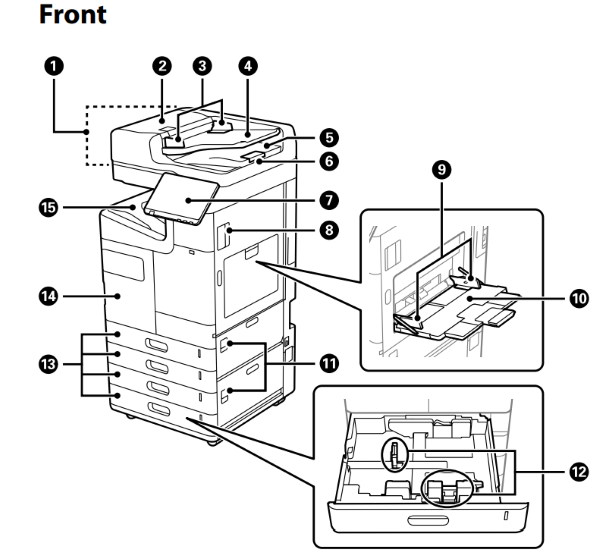
No. |
Part Name |
Description |
|---|---|---|
1 |
ADF (Automatic Document Feeder) |
Feeds originals automatically. |
2 |
ADF Cover (F) |
Open when removing jammed originals in the ADF. |
3 |
ADF edge guide |
Feeds originals straight into the printer. Slide to the edge of the originals. |
4 |
ADF input tray |
You can set multiple originals at once. |
5 |
ADF output tray |
Holds originals ejected from the ADF |
6 |
Stopper |
Prevents the ejected originals from falling from the ADF output tray. |
7 |
Control panel |
Allows you to make settings and perform operations on the printer. Also displays the printer’s status. |
8 |
Cover (D1) |
Open when removing jammed paper |
9 |
Edge guide |
Feeds the paper straight into the printer. Slide to the edges of the paper. |
10 |
Paper tray (B) |
Load paper for temporary use. You can load most paper available for this printer except for some of the paper. |
11 |
Cover (E,H) |
Open when removing jammed paper |
12 |
Edge guide |
Feeds the paper straight into the printer. Slide to the edges of the paper. |
13 |
Paper cassettes 1, 2, 3, 4 (C1, C2, C3, C4) |
Loads paper. C3 and C4 are optional. |
14 |
Front cover (A) |
Open when replacing the ink cartridge or the maintenance box. You can also pull out the internal lever to lock the cover to prevent theft. |
| 15 | Face down output tray (G) | Holds the ejected paper |
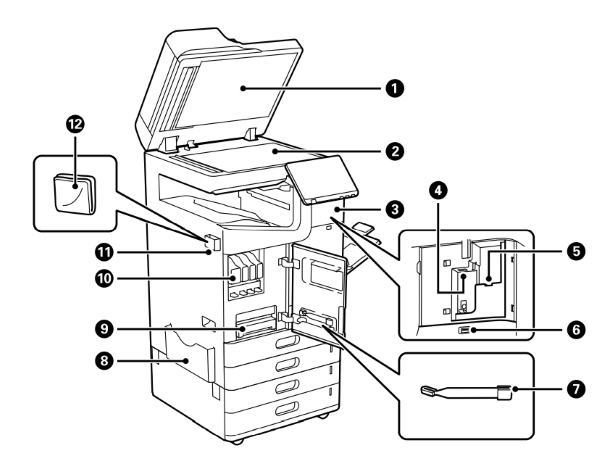
| No. | Part Name | Description |
|---|---|---|
| 1 | Document cover | Blocks external light during scanning. |
| 2 | Scanner glass |
Place the originals. You can place originals that are not fed from the ADF such as envelopes or thick books. |
| 3 | Cover | Open when installing options. |
| 4 | Wi-Fi unit port | Install the optional Wireless LAN Interface-P1 to connect to Wi-Fi. |
| 5 | Service USB port | Connect an authentication device such as an IC card reader. |
| 6 | External interface USB port | Connect memory devices. |
| 7 | Cleaning stick | This is a part for cleaning inside of the printer. |
| 8 | Document holder | Holds the manuals. You can also attach it to the rear. |
| 9 | Maintenance box | Collects waste ink discharged during cleaning and printing. Also includes maintenance fluid. |
| 10 | Ink cartridge | Install all four ink cartridges for four colors (AM-M5500: BK Only). |
| 11 | Cleaning cloth holder | Holds the cleaning cloth. You can also attach it to the rear. |
12 |
Cleaning cloth | Use to clean the glass surface of the scanner unit and the ADF. |
Rear
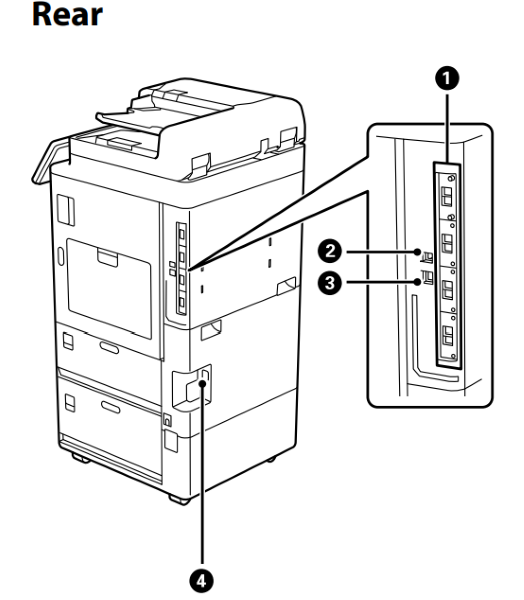
| No. | Part Name | Description |
|---|---|---|
| 1 | Additional interface slot | Use when Installing optional additional items. |
| 2 | USB port |
Connects a USB cable. |
| 3 | LAN port |
Connect the LAN cable. |
| 4 | AC inlet |
Connects the power cord. |
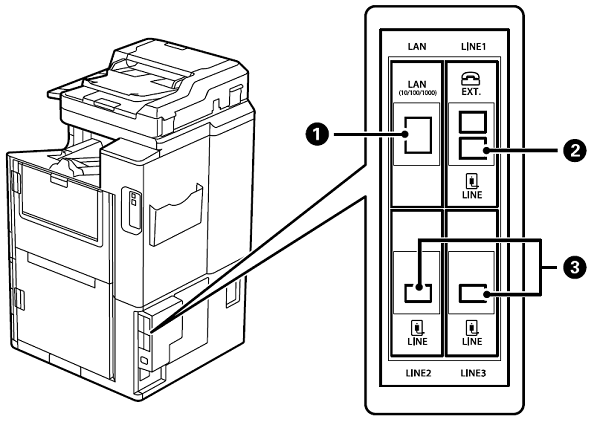
| No. | Part Name | Description |
|---|---|---|
| 1 | Additional Network Interface Board |
Two wired LAN networks are available. The communication speed is a high-speed interface that supports 1 Gbit/s. |
| 2 | Additional G3 Fax Board |
You can add up to 3 lines. You can use it as a fax, or use it as a network fax to send and receive documents on your computer. |
| 3 | Extension G3 Fax Board* |