
Ripple pattern
Assumed cause
- Flight bending occurs due to ink adhesion to the head nozzle surface
- PG is high, ink droplets are affected by air resistance and flight bend occurs
- High input voltage, high ink ejection speed (causing airflow inside the machine, causing flight bending)
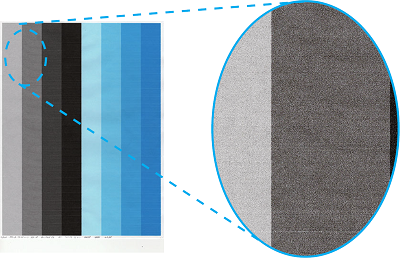

Defect-related parts
- HP Sensor, PG
PG failure - Head Unit
PG and input voltage setting value failure in head memory - Belt Drawer Unit
PG is changing due to Conveyor belt tilt
Troubleshooting
| Step | Confirmation and action | YES | NO |
|---|---|---|---|
| 1 | Run Head Cleaning (CL3)
|
End of work | Go to step 2 |
| 2 | Check device settings (including driver settings)
|
End of work | Go to step 3 |
| 3 | Replace the HP Sensor, PG
|
End of work | Go to step 4 |
| 4 | Replace the Head Unit
|
End of work | Go to step 5 |
| 5 | Replace the Belt Drawer Unit
(Check that the setting values of Head Memory, PG and Input Voltage are correct) |
End of work | Contact Epson local service representatives. |