
Menu List / Details
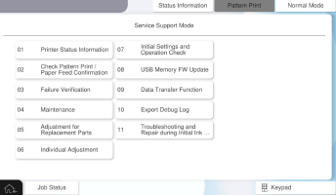
| No. | Menu items | Use scene | Overview |
|---|---|---|---|
| 01 | Printer Status Information | When checking the device status | Display the FW version of the product, error history, and life information of the regular replacement parts on the operation panel. |
| 02 | Check Pattern Print / Paper Feed Confirmation | During diagnosis (print quality, paper passing quality) | Output a diagnostic pattern to check print quality, and checks the paper feeding operation and paper ejecting operation of the main unit, ADF, and each option. |
| 03 | Failure Verification | During diagnosis (part failure) | Operate the main unit / optional components (motor / clutch / solenoid / sensor etc.) individually and check the operation. In addition, the operation of components that cannot be operated individually is confirmed by a special sequence operation to determine the location of a failure. |
| 04 | Maintenance | During maintenance | Perform head cleaning, belt cleaning, and ADF roller cleaning. |
| 05 | Adjustment for Replacement Parts | During repair work (parts need to be replaced) | Perform the necessary work / adjustments before and after the parts replacement (necessary work / adjustment items package for each part). |
| 06 | Individual Adjustment | During repair work (no need to replace parts) | Perform adjustment and confirmation work individually. |
| 07 | Installation Setting / Operation Check | When carrying-in / installing | Perform necessary operation checks and adjustments when installing the main unit and options. |
| 08 | USB Memory FW Update | When updating FW | Update the firmware via USB memory. |
| 09 | Date transfer function | When replacing products | Transfer the user data of the old machine to the new machine. |
| 10 | Export Debug Log | When collecting data for analysis | Save the log data for analysis to a USB memory. |
| 11 | 11 Troubleshooting and Repair during Initial Ink Charge | Before initial charging is complete or if the initial charging fails | it is possible to perform the Failure Verification and repair work (with limitations) and the initial charging after repairs work before the initial charging is complete or if the initial charging fails. |