
White lines (Colored lines) / Banding
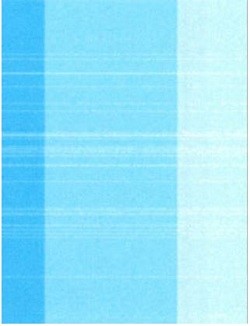


Assumed cause
- Poor print quality due to cockling (wrinkling) or curl of paper
- Head nozzle clogging
- Foreign objects on Nozzle surface
Defect-related parts
- Head Unit
Head nozzle clogging - Wiper Unit
Wiping failure on nozzle surface - Cap Unit
Cleaning failure on nozzle surface
Troubleshooting
| Step | Confirmation and action | YES | NO |
|---|---|---|---|
| 1 | Check the condition of the paper loaded in the tray. If the paper is wavy, curled, or otherwise in poor condition, replace it with paper taken out of a newly opened pack or stored in a humidity-controlled storage.
|
End of work | Go to step 2 |
| 2 | Check the symptom Print the color gradation pattern in the service support mode.(20103 Color Gradation Pattern (AM-M5500: Gradation Pattern))
|
Go to step 4 | Go to step 3 |
| 3 | Run the head cleaning (CL2) Run the CL2 cleaning from service support mode.(40103 CL2)
|
End of work | Go to step 4 |
| 4 | Replace the paper currently used with different type of paper. Use paper taken out of a newly opened pack or stored in a humidity-controlled storage.
|
End of work |
Go to step 5 |
| 5 | Perform Image quality adjustment Run the Head Angular Adjustment from service support mode.(60110 Head Angular Adjustment)
|
End of work | Go to step 6 |
| 6 | Replace the Head Unit
|
End of work | Go to step 7 |
| 7 | Replace the Wiper Unit
|
End of work | Go to step 8 |
| 8 | Replace the Cap Unit
|
End of work | Contact Epson local service representatives. |