
Changing service parameter
Starting FAX Parameter Setting
- Activate Authentication Mode. (Starting Authentication Mode)
- Select "FAX Maintenance Mode" from the top menu of Authentication Mode.
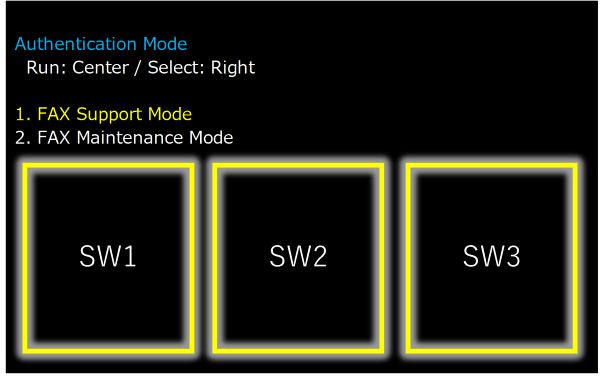
 Note / 補足
- Center of screen (SW2): Execution
- Right of screen(SW3): Move menu
- Select "FAX Parameter Setting".
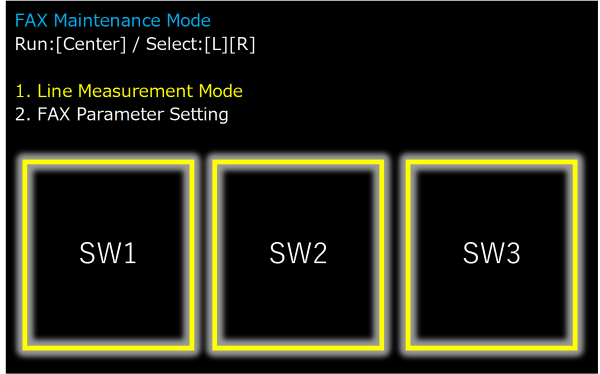 Note / 補足
- Center of screen (SW2): Execution
- Right of screen(SW3): Move menu
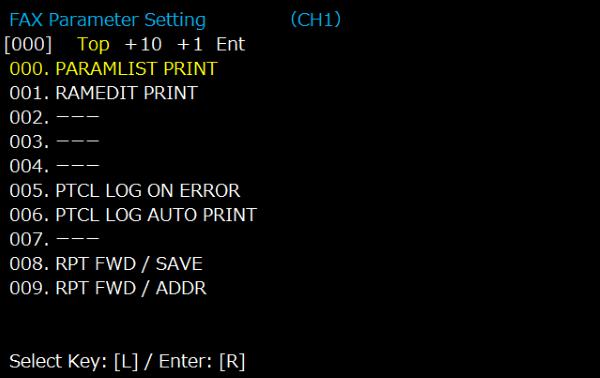
Example of changing service parameters.
"TX SIGNAL LEVEL" When changing the initial value "-10dBm" to "-15dBm".
| 1 | Press “Select Key: [L]” once, and select "+10" |
FAX Parameter Setting Select : [L] / Enter:[R] |
| 2 | The “Setting value input screen” (during input) is displayed as shown on the left. For the second digit, after confirming the first digit, select the value of the second digit by pressing Select: [L] the required number of times, move the cursor to the desired value, and press Enter: [R] to confirm the value. After confirming the value, press Select: [L] the required number of times to select “End”, and press Enter: [R] to confirm and end the adjustment value. |
FAX Parameter Setting |
| 3 | The “Set value input screen” (after input) is displayed as shown in the figure. The set value is displayed in []. |
FAX Parameter Setting 120 TX SIGNAL LEVEL Current : 10 [-dBm] Input New Value [ 15] ( 0 - 15) 1 2 3 4 5 6 7 8 9 0 End Select : [L] / Enter:[R] |
| 4 | The “Set value input screen” (after setting) is displayed as shown in the figure. The set value is displayed in "Current" at the top of the screen. To set parameters continuously, press Back to Parameter List [L] to move to the parameter selection screen. |
X Parameter Setting Parameter is set Back to Parameter List[L] |