
Fax log
 Note / 補足 Note / 補足 |
|
Printing Procedure
| Manual | [Fax] > [Menu] > [Fax Report Output] > [Fax log] |
|---|
Setting Method
| Report format setting | [Fax] > [Menu] > [Report Setting] > [Report Format] |
|---|---|
| Automatic print settings | [Fax] > [Menu] > [Report Setting] > [Fax log] |
Output Sample
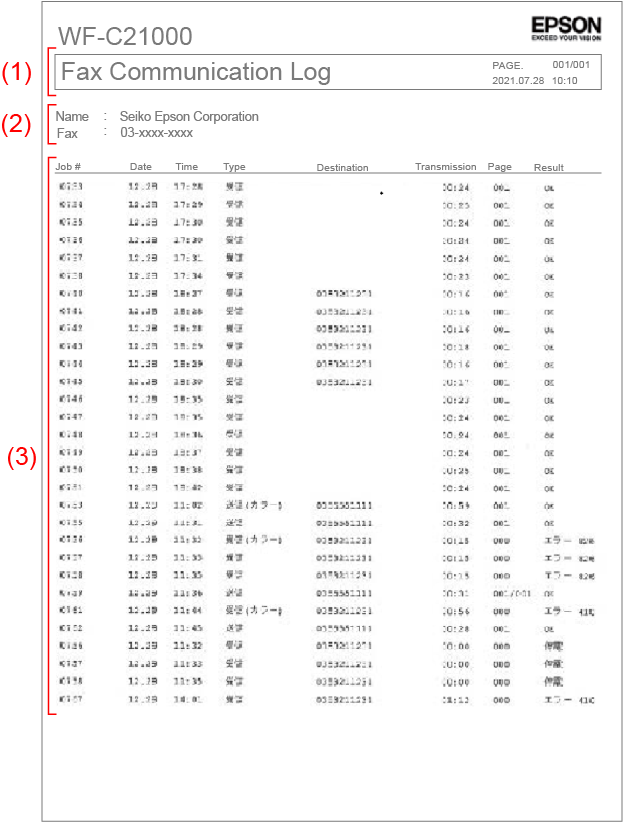
| (1) | Subject | Report name |
|---|---|---|
| PAGE. | Number of pages to be reported (number of pages/total number of pages) | |
| Date and time | Printed time (yyyy.mm.dd hh:mm) |
|
| (2) | Name | Registered sender name |
| Fax | Registered sender name | |
| (3) | Reception number | Job number |
| Date Time | Starting time of communication | |
| Type | Sending/Receiving/Polling Sending/Polling Reception/PC Sending/Forwarding |
|
| Destination number | Indications of destination number (in priority order) | |
| line | G3-1/ G3-2/ G3-3/ IP-NGN/ IP-LAN |
|
| Communication time | mm:ss | |
| Number of pages | Memory transmission: Number of successfully communicated pages/Total number of pages |
|
| Communication result | Succeeded: OK |
Indications of destination number (in priority order)
Sender (Send/Polling Receive)*1 |
|
|---|---|
Receiving side (Reception / Polling transmission)*1 |
|
*1:
Normally, the Sending = transmission/polling reception, and the receiving = reception/polling transmission, but if manual transmission/manual reception is performed, the reverse may occur.
Also, if you make a call using an "external phone" or "on-hook dial" and manually send/receive, the "recipient's fax ID" is always displayed.
*2:
According to the recommendation, only numbers, spaces, and + are registered as ID signals (CSI/TSI/CIG) for manual faxes, but other characters may be registered. In that case, it will be replaced with a space and displayed.
When register in the fax ID in this machine, select [Settings] → [Device Settings] → [Fax Settings] → [Basic Settings] → [Sender Settings] → [Sender Number] (numbers, spaces, and + only).
*3:
Displayed when the number display is set ([Fax Settings] → [Basic Settings] → [Number Display]) on a number display contract line and the caller's phone number is notified.
If the notification phone number is registered in the product's address book, the name registered in the address book will be displayed on the incoming call panel, but the phone number will also be displayed on the communication management report.
If the sender's phone number is not notified, the recipient's fax ID will be displayed.
Example of destination number
| Case | Description of destination number |
|---|---|
| If you receive a call on your number display line, answer it on your external phone, and then manually send the call. | On the sender, the ``sender's phone number'' is displayed instead of the ``recipient's fax ID''. |
| When make a call using an external phone and send it manually | On sender, the ``fax ID of the other party'' is displayed instead of the dialed phone number. |
| When making a call using on-hook dialing (address book/direct dialing) and performing manual transmission | On sender, the "fax ID of the other party" is displayed instead of the name registered in the address book/dialled phone number. |