
09 Date transfer function
This menu is used to swapping the machine printer information when replacing aircraft and when the ROM board fails.swapping the machine
 Caution / 注意 Caution / 注意 |
|
When swapping the machine.
Port the following parts from the failed machine (A) to the replacement machine (B).
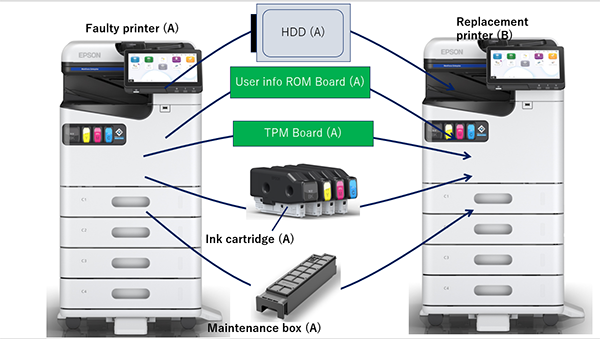
Parts Name Reason for moving HDD To transfer user information from the malfunctioned machine.
User info ROM board
TPM Board When the password encryption function is enabled, the HDD encryption key is linked to both the user information ROM board and the TPM board.
Ink cartridge
Because the consumption is stored in the user info ROM board.
Maintenance box
- Execute [901 Data transfer (Swapping the Machine)]. (901 Data Transfer (Swapping the Machine))
User information ROM board failure
- Replace the faulty user information ROM board with a new one (B).
- Start the service support mode from the power off state.
- Execute [902 Data transfer (user information ROM board failure)]. (902 Data Migration (user information ROM board failure))
When the mechanical information ROM board fails.
- Replace the defective mechanical information ROM board with a new one (B).
- Start the service support mode from the power off state.
- Execute [903 Data transfer (mechanical information ROM board failure)]. (903 Data Migration (Mechanical Information ROM Board Failure))
ROM Board Information Backup
 Note / 補足 Note / 補足 |
|
Back up the mechanical information and user information to the storage area on the ROM board. (904 ROM Board Information Backup)