
INKSYSTEM ASSY (WIPER AND CAP)
Tools
- Pure water
- Polyester swab (code: 1709718)
Cleaning procedure
Remove the Rear Cover (Back), Ink Eject Cover, Housing Right.
- The Rear Cover (refer to Step 1Rear Top Cover)
- Maintenance Box Cover
- Housing Right
Unlocks the CR.
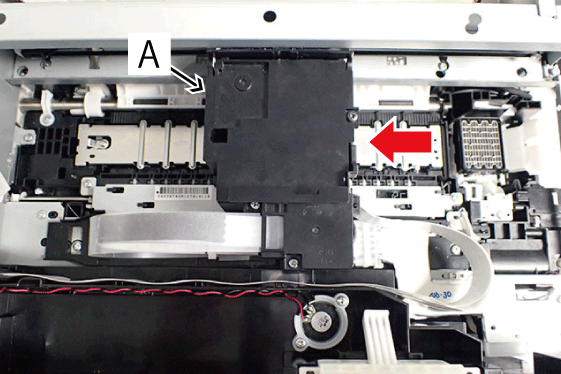
- Move the CR Unit (A) in the middle of the printer manually.
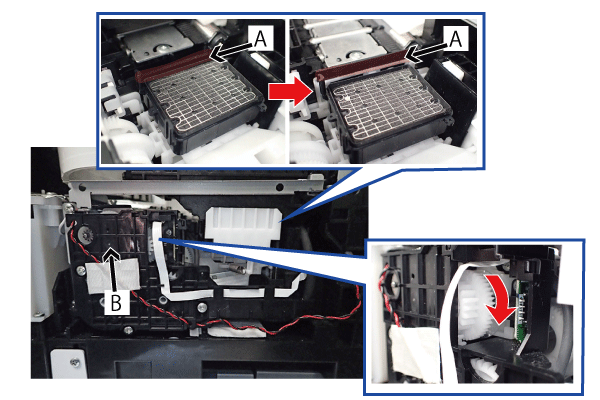
Rotate the gear of the Ink System Unit (B) in the direction of the arrow to move the Wiper (A) to wiping position.
 Caution / 注意
When rotating the gear of the Ink System Unit, take extra care not to damage or disconnect the FFC by touching it.
Clean the Wiper (A) and the cap part using the Polyester swab moistened with pure water.
Cleaning the Wiper
Clean the top end and right side of the Wiper (A) by moving the Polyester swab in the direction of the arrows as shown in the figure below.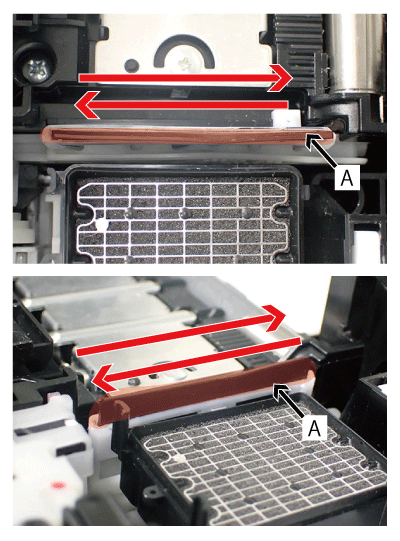 Caution / 注意
- If the Polyester swab is moved in a direction other than that indicated by the arrows in the figure above, the Wiper may shift. Therefore, always be sure to move it in the direction of the arrows.
- Be very careful when cleaning the Wiper as it is made of rubber and may be easily damaged.
Cleaning the Cap part
Clean the Cap surface by moving the Polyester swab in the direction of the arrows as shown in the figure below.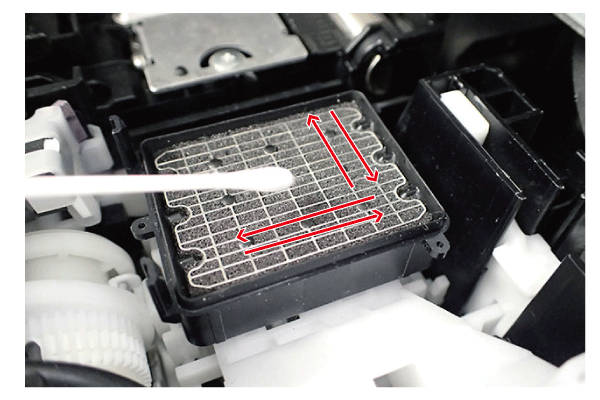 Caution / 注意
Do not forcibly press the Polyester swab as the Cap surface may be easily damaged.
- After cleaning the Wiper (A) and cap part is completed, rotate the gear of the Ink System Unit (B) in the direction of the arrow to retract the Wiper (A).
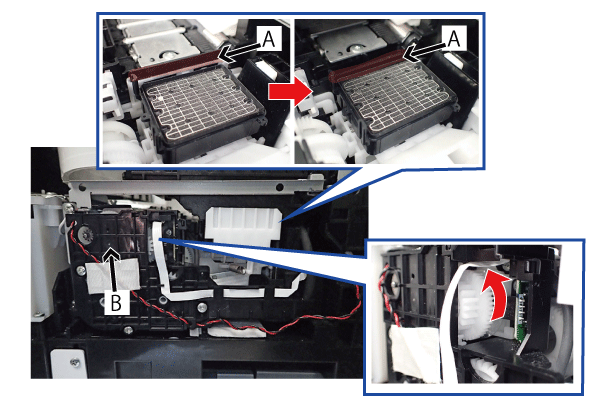 Caution / 注意
When rotating the gear of the Ink System Unit, take extra care not to damage or disconnect the FFC by touching it.
Reboot the printer without moving the CR Unit to the home position.
Caution / 注意By rebooting the printer, wiper storage and CR unit home position detection is performed in initial starting sequence.
If the CR Unit is moved to the home position manually, proper position cannot be detected, and the nozzle face of the Printhead may collide against the Wiper and get damaged. Therefore, make sure to reboot the printer.