
B63 BI-D BAND ADJUST (S)
Overview
Use software to correct the print timing for aligning the print position between the outward path and return path when bidirectional printing in band feed mode is used. Performs adjustments only on the areas identified for adjustment, and for others automatically calculates and determines the correction value.
Paper and feed tray
Paper size: A4, Letter
Paper type: Plain paper
Paper feed tray: Paper Cassette1st (C1) to paper cassette (C3)
Adjustment pattern
Same as B48 Bi-D Band Adjust
Judgment method
From among the printed patterns, select the pattern where the above and below lines are the straightest.
Work Procedure
Start the printer in the service mode.
Select "B63 Bi-D Band Adjust (S)" refer to "How to select an Adjustment item".
Load paper into the specified paper feed tray.
- Confirm the current setting and print the adjustment pattern.
When changing the print setting, select and change the item following the instruction on the screen.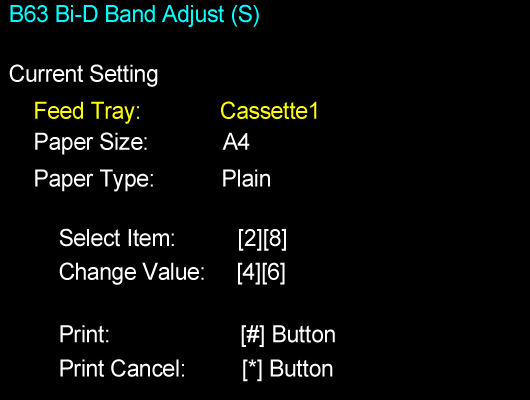
Check the adjustment pattern and determine the adjustment value based on the judgment procedure, and enter the adjustment value.
- Enter the adjustment value.
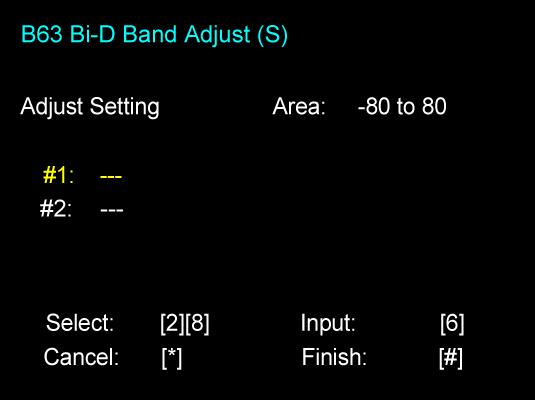
Perform the completion operation to save the adjustment value to the printer.
 Check Point / チェックポイント
If there is no pattern satisfying the judgment method among the adjustment patterns, there is a pattern satisfying the judgment method outside the scope of pattern printing. Therefore, select the best pattern and enter the adjustment value. Following this, again print the adjustment pattern and determine the adjustment value.