
B30 RGB PATTERN
Overview
Print patterns for checking the banding level of each color.
Paper and feed tray
Paper size: A4, Letter
Paper type: Plain paper, Business plain paper
Paper feed tray: Paper Cassette (C1) to paper cassette (C3), Rear ASF
Adjustment pattern
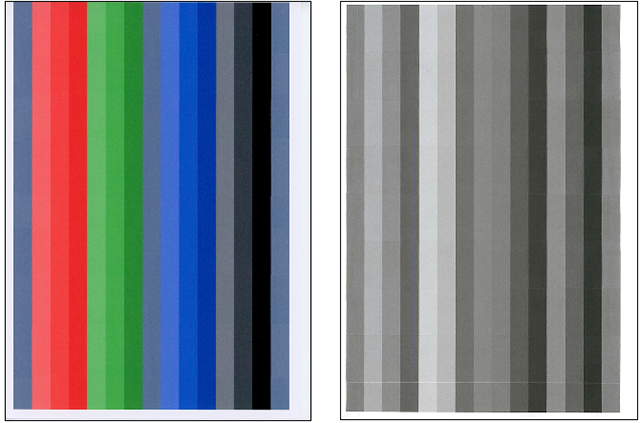
Criteria
Visually check the banding levels of the check pattern to confirm that there is no problem.
Work Procedure
Start the printer in the service mode.
Select “B30 RGB Pattern” refer to “How to select an Adjustment item”.
Load paper into the paper feed tray.
- Confirm the current setting and print the adjustment pattern.
When changing the print setting, select and change the item following the instruction on the screen.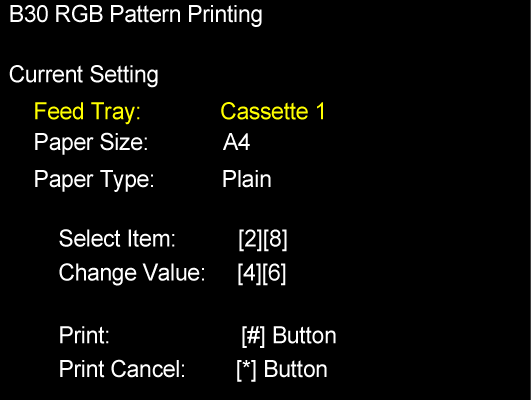
Check the check patterns. If not good, refer to the following table and take the corresponding measure.
No. Symptom Suspected cause Measure 1 Multiple white bands are occurring. Nozzles missing Perform head cleaning. 2 The banding level differs depending on the color. LUT_POL adjustment value is incorrect. Perform user adjustment (LUT_POL adjustment). 3 White banding or black banding is occurring over the entire pattern. Adjustment is incorrect. Perform band feed adjustment again. 4 White banding or black banding is occurring at the top and middle of the pattern. Adjustment is incorrect. Perform band feed adjustment again. 5 White banding or black banding is occurring at the bottom edge. Adjustment is incorrect. Perform band feed adjustment again.