
Protocol trace
A detailed report for the previous sent or received fax.
Auto Print after a fax transmission is available by changing the settings of Manual Print or FAX Parameter.
If communication has not started before the outgoing/incoming call operation (up to phase A but not to phase B), this log will be blank.
Printing Procedure
Manual |
[FAX] > [(Menu)] > [FAX Report] > [Protocol trace] = Select [Print] |
|---|---|
Auto |
Use Fax parameter Setting mode #006 to automatically print the log for every communication. Refer to "Communication protocol monitor log" in the service parameter table. |
Output Setting
Error only |
Fax parameter Setting mode #005 can be set to save/print only error communications. |
|---|---|
Auto |
Use Fax parameter Setting mode #007 to save one log/ save three log/print the Protocol trace. |
Output Sample
This sample is an example of a different model and may differ from the actual one.
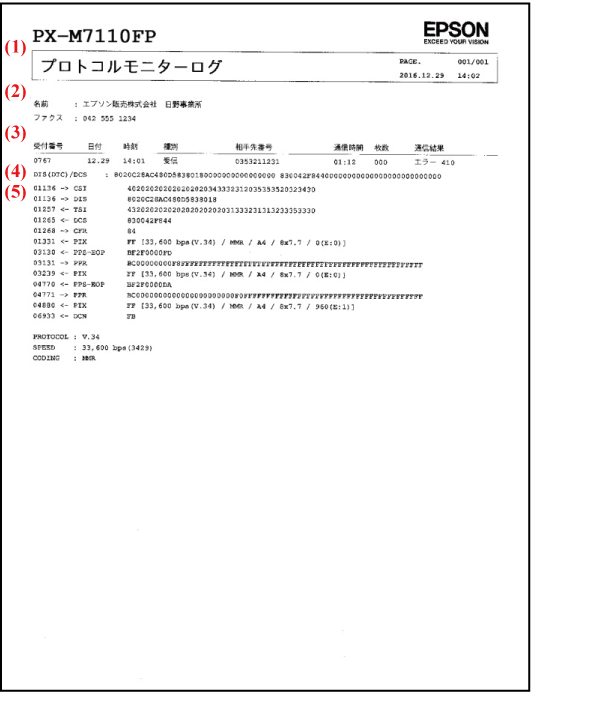
| (1) | Subject etc. | Same as Fax log. |
|---|---|---|
| (2) | Name, Fax | Sender’s name registered to the product |
| (3) | Reception number to Communication result | Logs of the received faxes. |
| (4) | DIS(DTC) /DCS | Refer to Viewpoint of DIS(DTS)/DCS. |
| (5) | Command / Response log | Refer to How to read the Command / Response log. |