
Attaching authentication device stand (option)
 Check Point / チェックポイント Check Point / チェックポイント |
Perform this procedure if an authentication device stand (option) need to be attached. |
- Preparing the authentication device stand (option)
Check that the following items are included in the package.Name Remarks 1 Authentication device stand 2 Authentication device stand fixing member 3 Double-sided tape for fixing authentication terminal 2 sheets 4 Authentication device stand fixing screws 3 pcs - Authentication device stand installation procedure
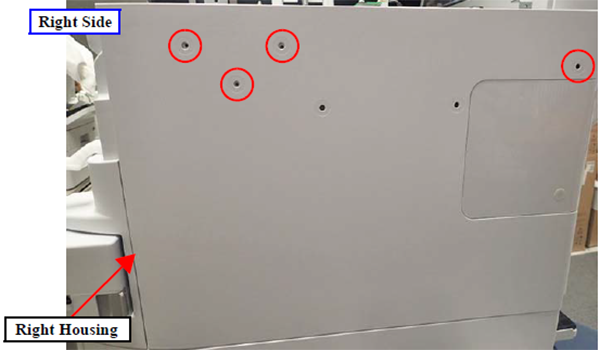
- Peel away the four blindfold seals on the Right Housing.
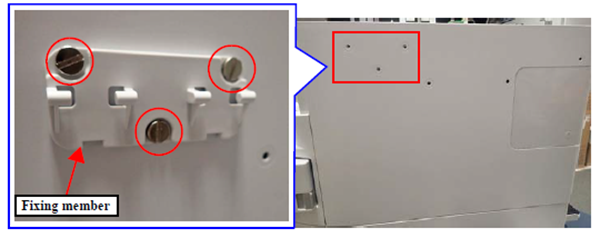
- Install the fixing member onto the main unit, and fix it in place with the three screws.
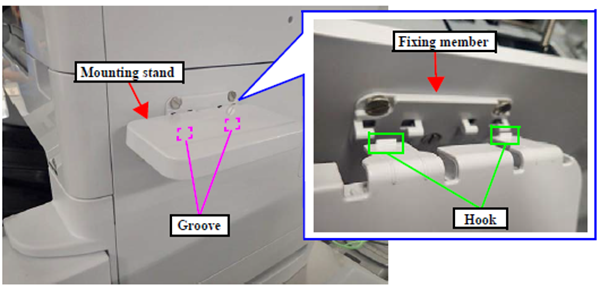
- Install the mounting stand as shown in the figure, and fix the mounting stand in place with its two hooks hooked into the grooves of the fixing member.
- Peel away the four blindfold seals on the Right Housing.