
Print Position Offset In Feed Direction
Symptom
- The image is offset in the sub scanning (feed) direction.
(Top and bottom margins are not equal.) - The top or bottom edge of the image is cut off.
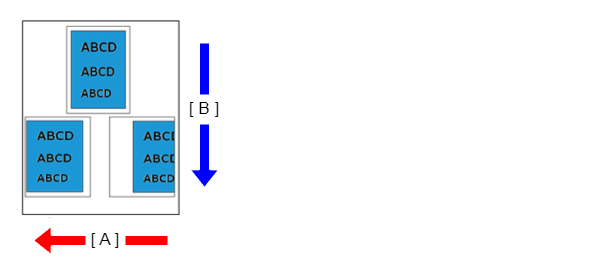
-
- A: Main scanning line (CR operation) direction
- B: Sub scanning line (feed) direction
Suspected cause
- Paper
- The paper settings of main unit or printer driver are not appropriate.
- Wear or wrong installation of rollers related to paper feeding
- PE Lever Assy failure
- PE sensor failure
- PW sensor problem
- Main Board Assy failure
Troubleshooting
| Step | Check and measure | Yes | No |
|---|---|---|---|
| 1 |
Check the paper Check that suitable paper (paper is not printed or does not have any punch holes, etc.) is being used. Make sure the appropriate paper has been used. |
Go to step 2 |
Change the paper to suitable paper. If nozzle missing is not improved after performing the above, go to step 2. |
| 2 | Check the settings Check the settings of the main unit/printer driver listed below.
Are the printer/driver settings appropriate? |
Go to step 3 |
Change the settings. If nozzle missing is not improved after performing the above, go to step 3. |
| 3 | Check the feed rollers and conveyance rollers Check the state of the feed rollers and conveyance rollers as shown below.
Nozzle condition is excellent? |
Go to step 4 |
*: When the PF roller is damaged or worn out, contact the Epson Service Support department. If nozzle missing is not improved after performing the above, go to step 4. |
| 4 | Check the PE sensor and the PE Lever Assy Execute the PE Sensor Check from the service support mode.
Nozzle condition is excellent? |
Go to step 5 |
Replace the PE Lever Assy. (Refer to PE Lever Assy (EM-C800 Series)/PE Lever Assy (EP-C800 Series).) If nozzle missing is not improved after performing the above, go to step 5. |
| 5 | Execute adjustment again Execute the following adjustments from the service support mode. Is the phenomenon continuing? |
Replace the Main board Assy. If the symptom continues to occur after replacing the Main Board Assy, contact the Epson Service Support department. |
End |