EM-C800/EP-C800 Service Manual Rev.G
EM-C800/EP-C800 Service Manual Rev.G
Revision History
Introduction
Notice:
About This Manual
Product Descriptions
Structure/Operating Principles
Installation and Setup
Troubleshooting
Disassembly & Assembly
Service Support Mode
Adjustments & Additional Operations
Maintenance/Inspection
Appendix
PRECAUTIONS
Symbols Used in this Manual
Product Descriptions
Product Descriptions
Printer Specifications
Printer Specifications
Supported Paper
Printing Specifications
Copying Specifications (EM-C800 Series only)
ADF Specifications (EM-C800 Series only)
Scanner Specifications (EM-C800 Series only)
Network Specifications/Fax Specifications
Network Specifications
FAX Specifications (EM-C800 Series only)
Consumables Information
Option Specifications
Structure/Operating Principle
Parts Names
EM-C800 Series
EP-C800 Series
Motor / Sensor / Clutch / Solenoid Specifications
Printer Main Unit
Motors and solenoids
Ink detection and cover detection system sensors
Encoder sensors and PW sensor
Paper feed and conveyance system sensors and other sensors
Optional Paper Cassette
Motors and sensors
Scanner
Motors and sensors
ADF
Motors and sensors
Printhead
Head angular mecha adjustment
Carriage Mechanism
Shifting PG (APG Mechanism)
APG Lever actions
PG type
Paper Loading/Paper Feed Mechanism
Paper Loading/Feed Path
Detail of Paper Loading/Feed Mechanism
Ink Supply Mechanism
Operating principles
Ink leak detection function
Ink System Mechanism
Operation Principle
Scanner / ADF Mechanism
Scanner Mechanism
ADF mechanism
Schematics (Block Diagrams) / Wiring Diagrams
Block Wiring Diagram
Connection Diagram
Housing related
ADF/SCN related
Ink supply related
Ink System related
Carriage related
Paper feed related
Electric circuit component related
Options
Installation and Settings
Overview of Introduction and Installation
Installation Workflow
Checks Before Installation
Dimensions when installing the printer
Installation Space
Checks Before Installation
Installation Procedure
Checking Items Included in Package
Removing Packaging Material and Protection Tape
CR fixing tape
Additional Cassette Unit Installation
Authentication device stand installation procedure
Bundled Items
Installation Procedure
Firmware Update
What to do when firmware update fails
Ink Information Display Setting
106 INK Rest Disp Change
107 INK Low Disp Change
Main Unit Settings
Setting the date and time
Initial Ink Filling
Network Setting
Printer IP address settings
How to set a static IP address
IP Address Setting Using DHCP
Setting wireless LAN
Wired LAN Setting
Setting the services cooperated
Fax Settings
Printing/operation checks
Nozzle check print
Copy function check
Operation check of ADF Unit
Operation check of Scanner Unit
Troubleshooting
Overview
Troubleshooting Workflow
List of Errors/Problems
Troubleshooting Errors with Error Indication
Normal Errors
Paper jam error
Detail of paper jam occurrence factor
Not feeding error
Error name
Error occurrence condition
Trouble related parts and causes
Troubleshooting
Stack collapsed error
Error name
Error occurrence condition
Trouble related parts and causes
Troubleshooting
No paper error
Error name
Error occurrence condition
Trouble related parts and causes
Troubleshooting
Cassette not installed error
Error name
Error occurrence condition
Trouble related parts and causes
Troubleshooting
Cassette failure error
Error name
Error occurrence condition
Trouble related parts and causes
Troubleshooting
Cover open error
Error name
Error occurrence condition
Trouble related parts and causes
Troubleshooting
Ink cartridge detection error
Error name
Error occurrence condition
Trouble related parts and causes
Troubleshooting
Maintenance box recognition error
Error name
Error occurrence condition
Trouble related parts and causes
Troubleshooting
Fatal Errors
ADF/SCN error
ADF PID excess speed detection (error code: 100001)
Cause
Suspected cause
Troubleshooting
ADF PID reverse detection (error code: 100002)
Cause
Suspected cause
Troubleshooting
ADF PID lock detection (error code: 100003)
Cause
Suspected cause
Troubleshooting
ADF PID excess load (error code: 100005)
Cause
Suspected cause
Troubleshooting
ADF PID driving time (error code: 100006)
Cause
Suspected cause
Troubleshooting
Home position detection failure (Error code: 100016)
Cause
Suspected cause
Troubleshooting
Contact detection distance exceeded (error code: 100017)
Cause
Suspected cause
Troubleshooting
MAIN-B connection Error (error code: 100048)
Cause
Suspected cause
Troubleshooting
MAIN-B Firmware version mismatch Error (error code: 100050)
Cause
Suspected cause
Troubleshooting
Paper jam error (error code: 100054)
Cause
Suspected cause
Troubleshooting
FB PID excess speed detection (error code: 100065)
Cause
Suspected cause
Troubleshooting
FB PID reverse error (Error code: 100066)
Cause
Suspected cause
Troubleshooting
FB PID lock error (Error code: 100067)
Cause
Suspected cause
Troubleshooting
FB PID excess load error (Error code: 100069)
Cause
Suspected cause
Troubleshooting
FB PID driving time error (error code: 100070)
Cause
Suspected cause
Troubleshooting
FB BS+ excess speed error(error code: 100073)
Cause
Suspected cause
Troubleshooting
FB BS+ reverse error (Error code: 100074)
Cause
Suspected cause
Troubleshooting
FB BS+ lock error (Error code: 100075)
Cause
Suspected cause
Troubleshooting
FB BS+ excess load error (error code: 100077)
Cause
Suspected cause
Troubleshooting
FB BS+ driving time error (error code: 100078)
Cause
Suspected cause
Troubleshooting
CR error
CR PID driving time error (error code: 000020)
Suspected cause
Troubleshooting
CR PID excess load error (error code: 000021)
Cause
Suspected cause
Troubleshooting
CR PID excess speed error (error code: 000022)
Cause
Suspected cause
Troubleshooting
CR PID reverse error (error code: 000023)
Suspected cause
Troubleshooting
CR PID lock error (error code: 000024)
Cause
Suspected cause
Troubleshooting
CR PID speed fall error (error code: 000025)
Cause
Suspected cause
Troubleshooting
CR PID excess load error 2 (error code: 000027)
Cause
Suspected cause
Troubleshooting
CR load position driving time error (error code: 000030)
Suspected cause
Troubleshooting
CR load position excess load error (error code: 000031)
Cause
Suspected cause
Troubleshooting
CR load position excess speed error (error code: 000032)
Cause
Suspected cause
Troubleshooting
CR load position reverse error (error code: 000033)
Cause
Suspected cause
Troubleshooting
PF error
PF PID driving time error (error code: 000040)
Suspected cause
Troubleshooting
PF PID excess load error (error code: 000041)
Cause
Suspected cause
Troubleshooting
PF PID excess speed error (error code: 000042)
Cause
Suspected cause
Troubleshooting
PF PID reverse error (error code: 000043)
Cause
Suspected cause
Troubleshooting
PF PID lock error (error code: 000044)
Cause
Suspected cause
Troubleshooting
PF load position driving time error (error code: 000050)
Suspected cause
Troubleshooting
PF load position excess load error (error code: 000051)
Cause
Suspected cause
Troubleshooting
PF load position excess speed error (error code: 000052)
Cause
Suspected cause
Troubleshooting
PF load position reverse error (error code: 000053)
Cause
Suspected cause
Troubleshooting
ASF error
ASF PID driving time error (error code: 000060)
Suspected cause
Troubleshooting
ASF PID excess load error (Error code: 000061)
Cause
Suspected cause
Troubleshooting
ASF PID excess speed error (error code: 000062)
Cause
Suspected cause
Troubleshooting
ASF PID reverse error (Error code: 000063)
Suspected cause
Troubleshooting
ASF PID lock error (Error code: 000064)
Suspected cause
Troubleshooting
ASF load position driving time error (error code: 000070)
Suspected cause
Troubleshooting
ASF load position excess load error (error code: 000071)
Suspected cause
Troubleshooting
ASF load position excess speed error (error code: 000072)
Cause
Suspected cause
Troubleshooting
ASF load position reverse error (error code: 000073)
Suspected cause
Troubleshooting
Additional ASF error
2nd ASF PID driving time error (error code: 000080)
Cause
Suspected cause
Troubleshooting
2nd ASF PID excess load error (Error code: 000081)
Cause
Suspected cause
Troubleshooting
2nd ASF PID excess speed error (error code: 000082)
Cause
Suspected cause
Troubleshooting
2nd ASF PID reverse error (Error code: 000083)
Cause
Suspected cause
Troubleshooting
2nd ASF PID lock error (Error code: 000084)
Cause
Suspected cause
Troubleshooting
2nd ASF load position driving time error (error code: 000090)
Cause
Suspected cause
Troubleshooting
2nd ASF load position excess load error (error code: 000091)
Cause
Suspected cause
Troubleshooting
2nd ASF load position excess speed error (error code: 000092)
Cause
Suspected cause
Troubleshooting
2nd ASF load position reverse error (error code: 000093)
Suspected cause
Troubleshooting
ASF3 PID driving time error (error code: 000540)
Cause
Suspected cause
Troubleshooting
ASF3 PID excess load error (Error code: 000541)
Cause
Suspected cause
Troubleshooting
ASF3 PID excess speed error (error code: 000542)
Cause
Suspected cause
Troubleshooting
ASF3 PID reverse error (Error code: 000543)
Cause
Suspected cause
Troubleshooting
ASF3 PID lock error (Error code: 000544)
Cause
Suspected cause
Troubleshooting
ASF3 load position driving time error (error code: 000550)
Cause
Suspected cause
Troubleshooting
ASF3 load position excess load error (error code: 000551)
Cause
Suspected cause
Troubleshooting
ASF3 load position excess speed error (error code: 000552)
Cause
Suspected cause
Troubleshooting
ASF3 load position reverse error (error code: 000553)
Cause
Suspected cause
Troubleshooting
ASF4 PID driving time error (error code: 000560)
Suspected cause
Troubleshooting
ASF4 PID excess load error (Error code: 000561)
Cause
Suspected cause
Troubleshooting
ASF4 PID excess speed error (error code: 000562)
Cause
Suspected cause
Troubleshooting
ASF4 PID reverse error (Error code: 000563)
Suspected cause
Troubleshooting
ASF4 PID lock error (Error code: 000564)
Cause
Suspected cause
Troubleshooting
ASF4 load position driving time error (error code: 000570)
Cause
Suspected cause
Troubleshooting
ASF4 load position excess load error (error code: 000571)
Cause
Suspected cause
Troubleshooting
ASF4 load position excess speed error (error code: 000572)
Cause
Suspected cause
Troubleshooting
ASF4 load position reverse error (error code: 000573)
Suspected cause
Troubleshooting
IS error
IS PID driving time error (error code: 000100)
Cause
Suspected cause
Troubleshooting
IS PID excess load error (error code: 000101)
Cause
Suspected cause
Troubleshooting
IS PID excess speed error(error code: 000102)
Cause
Suspected cause
Troubleshooting
IS PID reverse error (error code: 000103)
Suspected cause
Troubleshooting
IS PID lock error (error code: 000104)
Cause
Suspected cause
Troubleshooting
IS load position driving time error (error code: 000110)
Suspected cause
Troubleshooting
IS load position excess load error (error code: 000111)
Suspected cause
Troubleshooting
IS load position excess speed error (error code: 000112)
Suspected cause
Troubleshooting
IS load position reverse error (error code: 000113)
Cause
Suspected cause
Troubleshooting
Ink leak error (Error code: 034841)
Suspected cause
Troubleshooting
Additional LIFT error
LFT2 PID driving time error (error code: 000180)
Suspected cause
Troubleshooting
LFT2 PID excess load error (error code: 000181)
Cause
Suspected cause
Troubleshooting
LFT2 PID excess speed error (error code: 000182)
Cause
Suspected cause
Troubleshooting
LFT2 PID lock error (error code: 000184)
Cause
Suspected cause
Troubleshooting
LFT3 PID driving time error (error code: 000200)
Suspected cause
Troubleshooting
LFT3 PID excess load error (error code: 000201)
Cause
Suspected cause
Troubleshooting
LFT3 PID excess speed error (error code: 000202)
Cause
Suspected cause
Troubleshooting
LFT3 PID lock error (error code: 000204)
Cause
Suspected cause
Troubleshooting
LFT4 PID driving time error (error code: 000220)
Cause
Troubleshooting
LFT4 PID excess load error (error code: 000221)
Cause
Suspected cause
Troubleshooting
LFT4 PID excess speed error (error code: 000222)
Cause
Suspected cause
Troubleshooting
LFT4 PID lock error (error code: 000224)
Cause
Suspected cause
Troubleshooting
Printhead electrical error
Head-Hot detect error (before printing) (error code: 031001)
Cause
Suspected cause
Troubleshooting
Head-Hot detect error (after flushing) (error code: 031002)
Cause
Suspected cause
Troubleshooting
Head temp error (error code: 031004)
Cause
Suspected cause
Troubleshooting
Transistor temp error (error code: 031003)
Cause
Suspected cause
Troubleshooting
Blowout of a fuse error (Head) (error code: 031006)
Cause
Suspected cause
Troubleshooting
VBS overvoltage error (error code: 031008)
Cause
Suspected cause
Troubleshooting
HCS error (error code: 031011)
Cause
Suspected cause
Troubleshooting
Additional cassette FW error
Extension over connection error (error code: 032001)
Cause
Suspected cause
Troubleshooting
Incompatible expansion cassette connection error (error code: 032002)
Cause
Suspected cause
Troubleshooting
Additional setting state error 1 (Error code: 032051)
Cause
Suspected cause
Troubleshooting
Additional setting state error 2 (Error code: 032052)
Cause
Suspected cause
Troubleshooting
Addition recovery mode error (error code: 032101)
Cause
Suspected cause
Troubleshooting
Addition communication error 1 (Error code:032151)
Cause
Suspected cause
Troubleshooting
Addition communication error 2 (Error code:032152)
Cause
Suspected cause
Troubleshooting
Addition communication error 3 (Error code:032153)
Cause
Suspected cause
Troubleshooting
Addition communication error 4 (Error code:032154)
Cause
Suspected cause
Troubleshooting
Addition communication error 5 (Error code:032155)
Cause
Suspected cause
Troubleshooting
Addition communication error 6 (Error code:032156)
Cause
Suspected cause
Troubleshooting
Addition communication error 7 (Error code:032157)
Cause
Suspected cause
Troubleshooting
Addition communication error 8 (Error code:032158)
Cause
Suspected cause
Troubleshooting
Addition communication error 9 (Error code:032159)
Cause
Suspected cause
Troubleshooting
Addition communication error 10 (Error code:032160)
Cause
Suspected cause
Troubleshooting
Addition communication error 11 (Error code:032161)
Cause
Suspected cause
Troubleshooting
Addition communication error 12 (Error code:032162)
Cause
Suspected cause
Troubleshooting
Emergency stop error caused by cover opening (Error code: 030004)
Cause
Suspected cause
CSIC error
CRCM access error (hardware failure) (Error code: 033006)
Cause
Suspected cause
Troubleshooting
CRCM access error (hardware failure) (Error code: 033007)
Cause
Suspected cause
Troubleshooting
CRCM access error (firmware failure) (Error code:033008)
Cause
Suspected cause
Troubleshooting
Special print impossible error (error code: 033009)
Cause
Suspected cause
Troubleshooting
CSIC access error (hardware failure) (Error code: 033010)
Cause
Suspected cause
Troubleshooting
CSIC access error (hardware failure) (error code: 033011)
Cause
Suspected cause
Troubleshooting
Home position seek error (Error code: 034001)
Cause
Suspected cause
Troubleshooting
Motor runaway error (Error code: 034010)
Cause
Suspected cause
Troubleshooting
FW error
Error caused by other than printer device (Error code: 060001)
Cause
Suspected cause
Related parts
Troubleshooting
Driver mismatch error (Error code: 060002)
Cause
Suspected cause
Troubleshooting
Precautions for collecting the main unit log
Subtype code: Ink cartridge
Sub kind code: Maintenance Box
For problems without error indications
Feeding trouble
Double feeding
Symptom
Cause
Troubleshooting
Paper damaged or bent
Symptom
Cause
Troubleshooting
Printing/image quality trouble
Nozzles missing
Symptom
Cause
Troubleshooting
Nozzle missing state check matrix table
Ink Bleed
Symptom
Cause
Troubleshooting
White Or Black Bands
Symptom
Cause
Troubleshooting
Print Position Offset In CR Operation Direction
Symptom
Suspected cause
Troubleshooting
Print Position Offset In Feed Direction
Symptom
Suspected cause
Troubleshooting
Print Smudges
Symptom
Suspected cause
Troubleshooting
Blank printout (blank paper ejected)
Symptom
Suspected cause
Troubleshooting
Incorrect Colors
Symptom
Suspected cause
Troubleshooting
Lines not smooth and ruled-line deviation
Symptom
Suspected cause
Troubleshooting
ADF / Scanner Trouble
ADF / Scanner Trouble
Cause
Suspected cause
Troubleshooting
Other
Power Does Not Turn ON
Symptom
Suspected cause
Troubleshooting
Remedy of When The Check Pattern is not appropriate
Check Pattern Print (Plain)
Check Pattern Print (Matte)
Adjustment pattern
Checking target
Judgment method
Remedy
Service Nozzle Check Pattern
Adjustment pattern
Checking target
Judgment method
Remedy
CR・PF Pattern (PG1)
Adjustment pattern
Checking target
Judgment method
Remedy
PF Pattern (PG1)
Adjustment pattern
Checking target
Judgment method
PF Pattern (PG2)
Adjustment pattern
Checking target
Judgment method
Remedy
Rear ASF CR・PF Pattern (PG1)
Adjustment pattern
Checking target
Judgment method
Remedy
CR・PF Pattern (Dup)
Adjustment pattern
Checking target
Judgment method
Remedy
Gradation Pattern
Adjustment pattern
Checking target
Judgment method
Remedy
Failure Verification Function
Failure Verification Mode Starting Method
Fax Related Troubleshooting
Fax related troubleshooting
Fax Related Reports/Logs
FAX Communication Log
Print Procedure
Output Setting
Output Sample
Indications of destination number (in priority order)
Case example
Protocol trace
Print Procedure
Output Setting
Output Sample
Viewpoint of DIS(DTS)/DCS
DIS (DTC) Capability Bit Table
DCS Bit Assignment for Capabilities
How to read the Command / Response log
Commands/responses log_ Sample Example (Type = Sending)
Outline of the Command Response Log
Fax Function Check Report
Check Procedure
Output Sample
FAX Error Code
Overview
Telephone line based faxing
IP Faxing
FAX Service Parameter
Outline of setting change in FAX Maintenance Mode
Parameter changing procedure
FAX Service Parameter Table
Fax-related User Special Parameters
Emergency retrieval of received fax documents (FAX to PC)
Work procedure
Emergency Retrieval of Fax Received Originals (FAX to Memory)
Work procedure
Fax related troubleshooting
Fax troubleshooting basics
Troubleshooting basic step
Troubleshoot basic step details
Equipment information necessary for fax trouble report.
Troubleshooting by Fax Function Diagnosis
Troubleshooting from error codes
For IP faxing
Other Troubles
Removing the Ink Pack
Removing the Maintenance Box
Unlocking the CR Unit
CR Unlock (Service Support Mode)
CR Unlock (Hardware)
Unlocking the CR Unit (EM-C800 Series)
Unlocking the CR Unit (EP-C800 Series)
Repair and Adjustment
Repair Work Overview
Precautions before Repair Work
Discharging The Stored Electricity
Parts You Should Beware Of During Repair
Recommended Tools
Disassembly Flowchart
EM-C800 Series Disassembly Flowchart
Exterior Housing/Covers
Ink Supply Mechanism
ADF/SCN Mechanism
Electric Circuit Components
Ink System Mechanism
Carriage Mechanism
Paper Feed Mechanism (1/2)
Paper Feed Mechanism (2/2)
Option
EP-C800 Series Disassembly Flowchart
Exterior Housing/Covers
Ink Supply Mechanism
Electric Circuit Components
Ink System Mechanism
Carriage Mechanism
Paper Feed Mechanism (1/2)
Paper Feed Mechanism (2/2)
Option
Parts Layout Diagrams
Exterior Housing/Covers
EM-C800 Series
EP-C800 Series
Ink Supply Mechanism
ADF/SCN Mechanism
Electric Circuit Components
Ink System Mechanism
Carriage Mechanism
Paper Feed Mechanism
Options
Disassembly/Assembly
Housing (EM-C800 Series)
Rear Top Cover
ASF Cover
Paper support
Housing Rear
Housing Left
Housing Right
Housing Top
ADF/SCN Open Sensor
Housing (EP-C800 Series)
Rear Back Cover
Housing ASF
Paper support
ASF Cover
Housing Rear
Front Cover
Housing Left
Housing Right
Housing Upper
Printer Cover Open Sensor
Ink Supply Mechanism
Ink Supply Unit Front Cover
Ink Pack Tray BK/Ink Pack Tray CL
Rear Lower Cover Assy
Ink Supply Unit (EM-C800 Series)
Ink Supply Unit (EP-C800 Series)
Foot (EM-C800 Series)
Foot (EP-C800 Series)
CRCM FFC (EM-C800 Series)
CRCM FFC (EP-C800 Series)
Ink Leak Sensor Assy (EM-C800 Series)
Ink Leak Sensor Assy (EP-C800 Series)
Temperature and Humidity Sensor (EM-C800 Series)
Temperature and Humidity Sensor (EP-C800 Series)
Ink Supply Unit Lower Housing Assy (EM-C800 Series)
Ink Supply Unit Lower Housing Assy (EP-C800 Series)
Ink Porous Pad, 2 (EM-C800 Series)
Ink Porous Pad, 2 (EP-C800 Series)
Lock Lever (EM-C800 Series)
Lock Lever (EP-C800 Series)
Ink Tube Guide Holder (EM-C800 Series)
Ink Tube Guide Holder (EP-C800 Series)
Ink Porous Pad, 3 (EM-C800 Series)
Ink Porous Pad, 3 (EP-C800 Series)
Decompression Pump (EM-C800 Series)
Decompression Pump (EP-C800 Series)
CRCM Board Assy (EM-C800 Series)
CRCM Board Assy (EP-C800 Series)
ADF/SCN Mechanism (EM-C800 Series only)
ADF/SCN Unit
ADF Cover Unit
Hinge Assy (Left)
Hinge Assy (Right)
ADF Document Support
ADF Front Cover
Document Mat
ADF LD Roller Spring
Separation Pad
Rear ADF Cover
ADF LD Roller
Separation Pad Spring
Electric Circuit Components
Fax Assy
USB Interface Board
Wireless Lan Module (EM-C800 Series)
Wireless Lan Module (EP-C800 Series)
Relay Board Assy (EM-C800 Series)
Relay Board Assy (EP-C800 Series)
PDL Board (EM-C800 Series)
PDL Board (EP-C800 Series)
SD Memory (EM-C800 Series)
SD Memory (EP-C800 Series)
Speaker Assy
Panel Assy (EM-C800 Series)
Panel Assy (EP-C800 Series)
Relay Cable (Panel to Main) (EM-C800 Series)
Relay Cable (Panel to Main) (EP-C800 Series)
Numpad Board Assy
Main Board Assy (EM-C800 Series)
Main Board Assy (EP-C800 Series)
Power Supply Assy (EM-C800 Series)
Power Supply Assy (EP-C800 Series)
Ink System Mechanism
Maintenance Box Cover
Ink Porous Pad, 4
Maintenance Box Detection Sensor Assy (EM-C800 Series)
Maintenance Box Detection Sensor Assy (EP-C800 Series)
Ink System Unit (EM-C800 Series)
Ink System Unit (EP-C800 Series)
Ink Porous Pad, 1 (EM-C800 Series)
Ink Porous Pad, 1 (EP-C800 Series)
Carriage Mechanism
CR Scale Spring (EM-C800 Series)
CR Scale Spring (EP-C800 Series)
CR Scale (EM-C800 Series)
CR Scale (EP-C800 Series)
Bind Screw2.5 x 25 (w/washer) (EM-C800 Series)
Bind Screw2.5 x 25 (w/washer) (EP-C800 Series)
H.N.-1,2.5,F/ZN-3C (EM-C800 Series)
H.N.-1,2.5,F/ZN-3C (EP-C800 Series)
Bind Screw3 x 12 (w/washer) (EM-C800 Series)
Bind Screw3 x 12 (w/washer) (EP-C800 Series)
Ink Supply Tube Assy (EM-C800 Series)
Ink Supply Tube Assy (EP-C800 Series)
Head Screw Assy (EM-C800 Series)
Head Screw Assy (EP-C800 Series)
Printhead (EM-C800 Series)
Printhead (EP-C800 Series)
Head FFC Assy (EM-C800 Series)
Head FFC Assy (EP-C800 Series)
CR Driven Pulley Assy (EM-C800 Series)
CR Driven Pulley Assy (EP-C800 Series)
CR Motor Assy (EM-C800 Series)
CR Motor Assy (EP-C800 Series)
CR Unit (EM-C800 Series)
CR Unit (EP-C800 Series)
Paper Feed Mechanism
C1 Cassette
Stacker Assy
Rear Unit
C1 cassette feed roller
PF Encoder Board (EM-C800 Series)
PF Encoder Board (EP-C800 Series)
PF Scale (EM-C800 Series)
PF Scale (EP-C800 Series)
Star Wheel Unit (EM-C800 Series)
Star Wheel Unit (EP-C800 Series)
Rear ASF Unit (EM-C800 Series)
Rear ASF Unit (EP-C800 Series)
Rear ASF Solenoid (EM-C800 Series)
Rear ASF Solenoid (EP-C800 Series)
Rear ASF Paper Detection Sensor (EM-C800 Series)
Rear ASF Paper Detection Sensor (EP-C800 Series)
Rear Unit Detection Sensor (EM-C800 Series)
Rear Unit Detection Sensor (EP-C800 Series)
Feed sensor (EM-C800 Series)
Feed sensor (EP-C800 Series)
Feed Sensor Detection Lever (EM-C800 Series)
Feed Sensor Detection Lever (EP-C800 Series)
Feed Sensor Detection Lever Spring (EM-C800 Series)
Feed Sensor Detection Lever Spring (EP-C800 Series)
Cassette Detection Sensor (EM-C800 Series)
Cassette Detection Sensor (EP-C800 Series)
ASF Drive Gear Assy (EM-C800 Series)
ASF Drive Gear Assy (EP-C800 Series)
Cassette Paper Detection Sensor (EM-C800 Series)
Cassette Paper Detection Sensor (EP-C800 Series)
Paper Guide Upper Assy Spring (EM-C800 Series)
Paper Guide Upper Assy Spring (EP-C800 Series)
Paper Guide Upper Assy (EM-C800 Series)
Paper Guide Upper Assy (EP-C800 Series)
PE Lever Assy (EM-C800 Series)
PE Lever Assy (EP-C800 Series)
PE Sensor (EM-C800 Series)
PE Sensor (EP-C800 Series)
Drive Gear Shaft (EM-C800 Series)
Drive Gear Shaft (EP-C800 Series)
Drive Gear Assy (EM-C800 Series)
Drive Gear Assy (EP-C800 Series)
Options
Additional Cassette Feed Roller
E-ring (plastic)
One-way Gear
Lift Up Sector Gear 40T
Lift Up Gear 30T
Paper Feed Detector Lever
Torsion Spring 0.9
Vertical Feed Roller
Rear Lower Cover Assy
Optional Paper Cassette Rear Cover
Optional Paper Cassette Right Cover
Optional Paper Cassette Rear Cover Slider
Paper Guide Sub
Optional Paper Cassette Left Cover
Hopper Drive Assy
ASF Encoder Assy
Optional Paper Cassette Main Board Assy
Lift Motor
ASF Motor
Paper Cassette 2nd Assy
Direction Definitions
Service Support Mode
Starting Service Support Mode
Start from the power ON
Start from the power OFF
Menu List / Details
01 Printer Status Information
101 Status Information
102 Service Status Sheet Print
103 Counter Information
Menu list
Confirm and reset procedure
104 Export Status Sheet Data
Status sheet to be saved
Data acquisition procedure
02 Check Pattern Print
201 Check Pattern
20101 Check Pattern Print (Plain)
20102 Check Pattern Print (Matte)
20103 Service Nozzle Check Pattern
20104 CR・PF Pattern(PG1)
Procedure
20105 PF pattern (PG1)
Procedure
20107 PF pattern (PG2)
Procedure
20109 Rear ASF CR/PF pattern (PG1)
Procedure
20110 CR・PF Pattern (Dup)
Procedure
20112 Gradation Pattern
202 Paper Feed Confirmation
203 Paper Feed Confirmation (ADF)
03 Failure Verification
301 Failure Diagnostics Sequence
Menu list
302 Main Unit
30201 Motor
Menu list
Procedure
30202 Sensor
Menu list
30205 Others
Menu list
Procedure
3020503 Ink Leakage Sensor
For new type Ink Supply Unit
For old type Ink Supply Unit
303 Additional Cassette
30301 Motor
Menu list
30302 Sensor
Menu list
04 Maintenance
401 Head Cleaning
Menu list
05 Adjustment for Replacement Parts
501 Main Unit
50101 Head & Ink Path
5010101 Print Head
Print Head Before Parts Replacement
Procedure
Print Head After Parts Replacement
Procedure
5010102 Ink Supply Unit
Ink Supply Unit Before Parts Replacement
Procedure
Ink Supply Unit After Parts Replacement
Procedure
5010103 Ink System Unit
Ink System Unit Before Parts Replacement
Procedure
Ink System Unit After Parts Replacement
Procedure
5010104 Head FFC
Head FFC Before Parts Replacement
Procedure
Head FFC After Parts Replacement
Procedure
5010105 Ink Supply Tube Assy
Ink Supply Tube Assy Before Parts Replacement
Procedure
Ink Supply Tube Assy After Parts Replacement
Procedure
50102 Paper Feed/Eject Parts
5010201 Rear ASF Unit
Rear ASF Unit Before Parts Replacement
Procedure
Rear ASF Unit After Parts Replacement
Procedure
5010202 C1 Pickup Roller
C1 Pickup Roller Before Parts Replacement
Procedure
C1 Pickup Roller After Parts Replacement
Procedure
5010205 CR Unit
CR Unit Before Parts Replacement
Procedure
CR Unit After Parts Replacement
Procedure
5010206 CR Motor Assy
CR Motor Assy Before Parts Replacement
Procedure
CR Motor Assy After Parts Replacement
Procedure
5010207 PE Lever Assy
PE Lever Assy Before Parts Replacement
Procedure
PE Lever Assy After Parts Replacement
Procedure
5010208 C1 Cassette
C1 Cassette Before Parts Replacement
Procedure
C1 Cassette After Parts Replacement
Procedure
5010209 Star Wheel Assy
Star Wheel Assy Before Parts Replacement
Procedure
Star Wheel Assy After Parts Replacement
Procedure
5010211 Drive Gear Assy
Drive Gear Assy Before Parts Replacement
Procedure
Drive Gear Assy After Parts Replacement
Procedure
5010212 Rear Unit
Rear Unit Before Parts Replacement
Procedure
Rear Unit After Parts Replacement
Procedure
5010213 CR Scale
CR Scale Before Parts Replacement
Procedure
CR Scale After Parts Replacement
Procedure
50103 Electric Parts
5010302 Temperature and Humidity Sensor
Temperature and Humidity Sensor Before Parts Replacement
Procedure
Temperature and Humidity Sensor After Parts Replacement
Procedure
5010303 Ink Leakage Sensor
Ink Leakage Sensor Before Parts Replacement
Procedure
Ink Leakage Sensor After Parts Replacement
Procedure
502 Additional Cassette
50201 Paper Feed Related Parts
5020101 C2 Pickup Roller
C2 Pickup Roller Before Parts Replacement
Procedure
C2 Pickup Roller After Parts Replacement
Procedure
5020102 C3 Pickup Roller
C3 Pickup Roller Before Parts Replacement
Procedure
C3 Pickup Roller After Parts Replacement
Procedure
5020103 C4 Pickup Roller
C4 Pickup Roller Before Parts Replacement
Procedure
C4 Pickup Roller After Parts Replacement
Procedure
5020104 C2 Cassette
C2 Cassette Before Parts Replacement
Procedure
C2 Cassette After Parts Replacement
5020105 C3 Cassette
C3 Cassette Before Parts Replacement
Procedure
C3 Cassette After Parts Replacement
Procedure
5020106 C4 Cassette
C4 Cassette Before Parts Replacement
Procedure
C4 Cassette After Parts Replacement
Procedure
503 ADF/SCN
50301 ADF / SCN Related Parts
5030101 ADF/SCN Unit
ADF/SCN Unit Before Parts Replacement
Procedure
ADF/SCN Unit After Parts Replacement
Procedure
06 Individual Adjustment
601 Printer/Additional Cassette
60101 CR Motor Correction
Overview
Required Tool
Procedure
60102 PF Motor Correction
Overview
Required Tool
Procedure
60103 C1 ASF Motor Correction
Overview
Required Tool
Procedure
60104 C2 ASF/ Lift Motor Correction
Overview
Required Tool
Procedure
60105 C3 ASF/ Lift Motor Correction
Overview
Required Tool
Procedure
60106 C4 ASF/ Lift Motor Correction
Overview
Required Tool
Procedure
60107 IS Motor Correction
Overview
Required Tool
Procedure
60108 Head ID Input
Overview
Required Tool
Procedure
60109 Nozzle Noise Check
Overview
Required Tool
Procedure
60110 Nozzle Rank Categorise
Overview
Required Tool
Procedure
60111 Nozzle Detect Check
Overview
Required Tool
Procedure
60115 Head Angular Adj. (H/W)
Overview
Required Tool
Procedure
60116 Head Angular Adj. (S/W)
Overview
Required Tool
Procedure
60118 PTS Acc./ Dec. Adj.
Overview
Required Tool
Procedure
60119 PTS Acc./ Dec. Adj. (Simple)
Overview
Required Tool
Procedure
60120 Bi-D Adj.
Overview
Required Tool
Procedure
60121 Bi-D Adj. (Simple)
Overview
Required Tool
Procedure
60122 Bi-D Band Adj.
Overview
Required Tool
Procedure
60123 Bi-D Band Adj. (Simple)
Overview
Required Tool
Procedure
60124 PW Sensor Correction
Overview
Required Tool
Procedure
60125 PW Sensor Initialize
Overview
Required Tool
Procedure
60126 Cassette Print Position Adj.
Overview
Required Tool
Procedure
60127 Rear ASF Print Position Adj.
Overview
Required Tool
Procedure
60128 Cassette PE Adj.
Overview
Required Tool
Procedure
60129 Rear ASF PE Adj.
Overview
Required Tool
Procedure
60130 PF/ EJ Adj.
Overview
Required Tool
Procedure
60132 PF Band Feed Adj.
Overview
Required Tool
Procedure
60133 PF Band Feed Adj. (Simple)
Overview
Required Tool
Procedure
60141 Special Ink Charge
6014101 Head Ink Charge
Overview
Required Tool
Procedure
6014102 Initial Ink Charge
Overview
Required Tool
Procedure
60142 Ink Discharge
6014201 Head Ink Discharge
Overview
Required Tool
Procedure
6014202 Supply Ink Discharge
Overview
Required Tool
Procedure
6014203 Suction Pump Ink Discharge
Overview
Required Tool
Procedure
60143 CR Unlock & Power OFF
Overview
Required Tool
Procedure
602 ADF/SCN
60201 Shading Calibration (Back)
Overview
Required Tool
Procedure
60202 Density Calibration
Overview
Required Tool
Procedure
60203 ADF Scanning Adj. (600dpi)
Overview
Required Tool
Procedure
60204 ADF Scanning Adj. (300dpi)
Overview
Required Tool
Procedure
07 Installation /Operation Check
707 Paper Feed/Print Quality Check
70701 Paper feed confirmation
Procedure
70702 Paper Feed Confirmation (ADF)
Procedure
70703 Check Pattern Print (Plain)
Procedure
70704 Check Pattern Print (Matte)
Procedure
70705 Service Nozzle Check Pattern
Procedure
08 USB Memory FW Update
Preparation
09 Date Transfer Function
901 Main Board Replacement
90101 Data Backup
90102 Data Restore
90103 Data Delete
902 Machine Swapping
90201 Data Backup
90202 Data Restore
90203 Data Delete
10 Acquire Debug Log
Adjustments & Additional Operations
List of Tools/Software/Consumables for Adjustments
Tools and Jigs
Adjustments and Check Items Purpose
Mechanical Adjustments and Inspections
Adjustments and Check Items Details
Mechanical Adjustments and Inspections
Check the PG
Tools
Flow of checking the PG
Preparing the thickness gauge
Application procedure of Teflon tape
Check the PG
Preparation for the PG adjustment
PG adjustment procedure
Maintenance and Inspections
Overview
Storing
Moving or Transporting the Printer
EM-C800 Series transport preparations
EP-C800 Series transport preparations
Life/Periodical Replacement Parts
Cleaning
Exterior Parts Such As Housing
Inside The Pinter
Rubber or plastic rollers in the paper feed mechanism such as LD Roller/Pickup Roller
Scanner Glass
Ink System Unit (Wiper and Cap)
Tools
Cleaning procedure
Lubrication
Lubrication points list
Lubrication 1
Lubrication 2
Lubrication 3
Lubrication 4
Lubrication 5
Lubrication 6
Lubrication 7
Lubrication 8
Lubrication 9
Appendix
Repair Work Time List (MTTR)
EP-C800 Series
EM-C800 Series
Panel Menu Map
EM-C800 Series
EP-C800 Series
List of parts for which the Adjustment for Replacement Parts menu is not available
Abbreviations List
#
Removing the Ink Pack
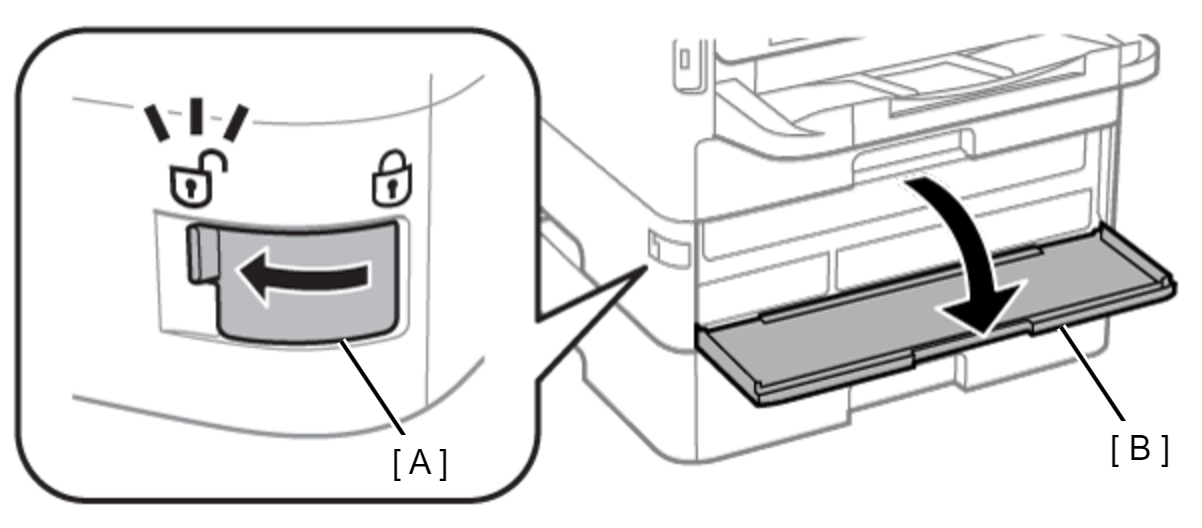
Slide the Cover Lock (A) in the direction of the arrow, then open the Ink Cover (B).
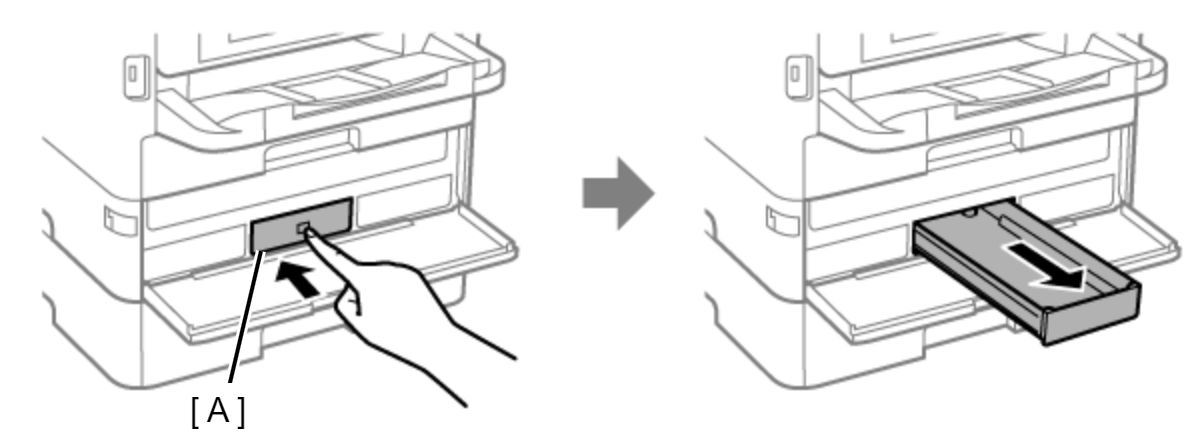
Push the Ink Pack Tray (A), then remove it.
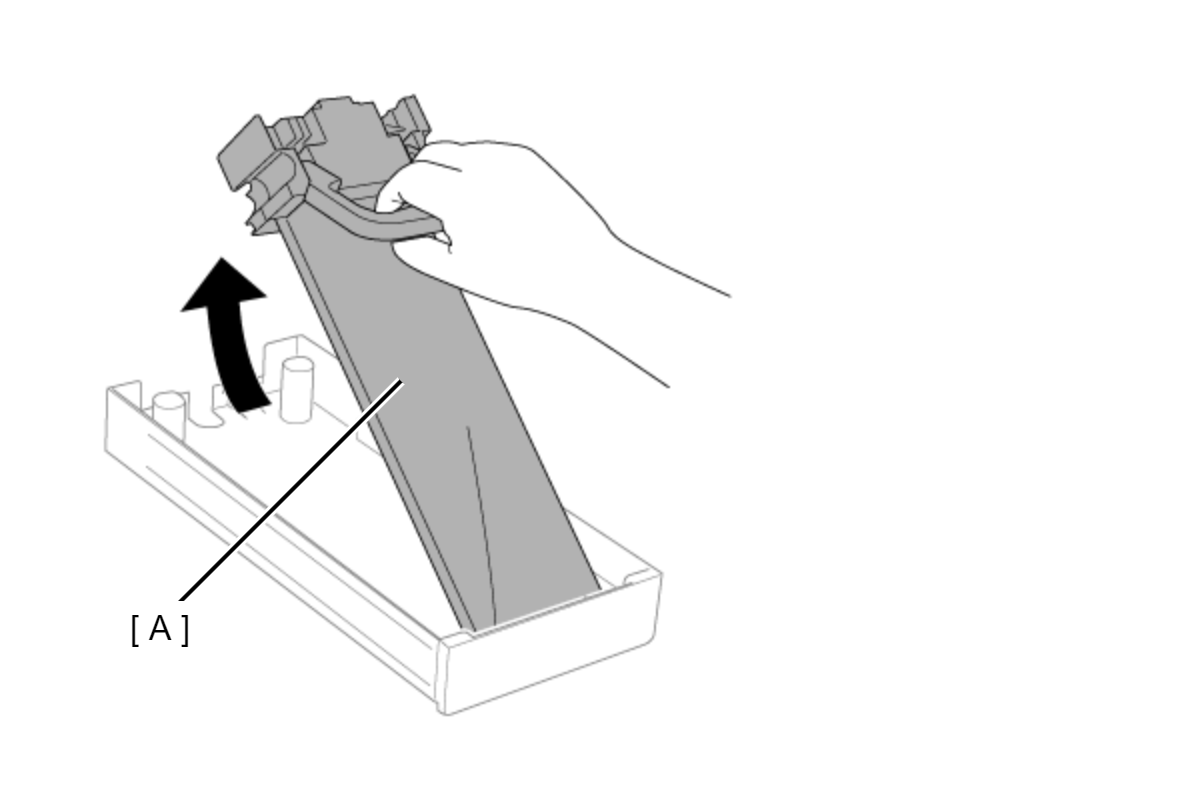
Remove the Ink Pack (A).
Repeat the operation from step 2 for the other ink packs.