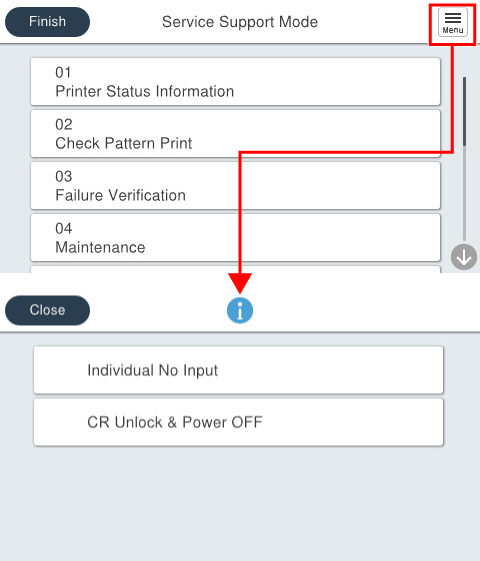
Menu List / Details
| Program No. | Menu items | Use scene | Overview |
|---|---|---|---|
| 01 | Printer Status Information | When checking the device status | Display the FW version of the product, error history, and life information of the regular replacement parts on the operation panel. In addition, it outputs the status sheet in which information necessary for the service is described, and acquires various status sheets in txt. format. |
| 02 | Check Pattern Print | During diagnosis (print quality, paper passing quality) | Output a diagnostic pattern to check print quality, and checks the paper feeding operation and paper ejecting operation of the main unit, ADF, and each option. |
| 03 | Failure Verification | During diagnosis (part failure) | Operate the main unit / optional components (motor / sensor etc.) individually and check the operation. In addition, the operation of components cannot be operated individually is confirmed by a special sequence operation and specify the location of a failure. |
| 04 | Maintenance | During maintenance | Perform head cleaning. |
| 05 | Adjustment Table for each Replacement Part | During repair work (parts need to be replaced) | Perform necessary work / adjustment before and after parts replacement (necessary work / adjustment is packaged for each part). |
| 06 | Individual Adjustment | During repair work (no need to replace parts) | Perform adjustment and confirmation work individually. |
| 07 | Installation /Operation Check | When carrying-in / installing | Perform necessary operation checks and adjustments when installing the main unit and options. |
| 08 | USB Memory FW Update | When updating FW | Update the firmware via USB memory. |
| 09 | Date transfer function | When replacing products | Transfer the user data of the old machine to the new machine. |
| 10 | Acquire Debug Log | When collecting data for analysis | Save the log data for analysis to a USB memory. |
 Note / 補足 Note / 補足 |
|