
Precautions before Repair Work
Discharging The Stored Electricity
Immediately after powering off the printer, electricity is stored in the electric circuit of printer.
If you disassemble the printer in this state, you may get an electric shock. And also, the electrical parts may be damaged.
Therefore, make sure to perform the following operation of discharging the stored electricity before disassembling the printer.
Procedure
- Power Off the printer, and disconnect the AC Cable form the printer.
Press and hold the Power button.
 Caution / 注意
The Power LED lights for a few seconds when the power supply button is pushed. Make sure to push the Power button until Power LED is turned off.
When the Power LED is turned off or the Power LED does not light even if the Power button is pressed, this operation is finished.
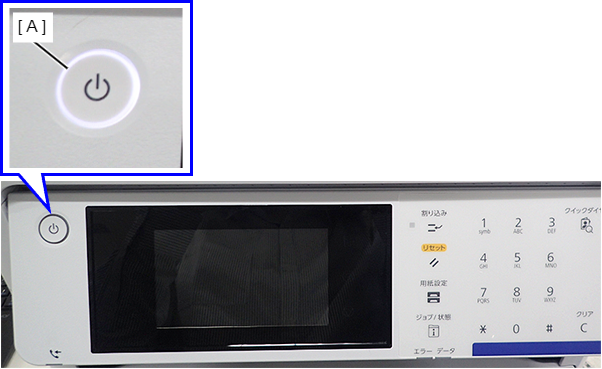
- A: Power LED lights when power supply button is pushed.
Parts You Should Beware Of During Repair
To prevent injury during disassembly/reassembly of the product, the parts with a potential danger when handling them are listed below. Take extra care during disassembly/reassembly.
ADF/SCN
You may get injured if your hand get caught when the opened Scanner/ADF Unit (A) has been suddenly closed.
Therefore, do not disassemble/reassemble the printer with the Scanner/ADF Unit (A) open.
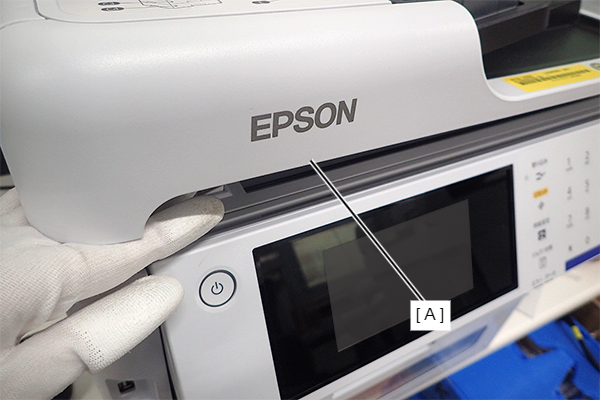
Sharp edges of metal plates around the Inksystem
Make sure to wear gloves during repair.
Be especially careful not to get injured by the sharp edges when lifting the mechanism unit.