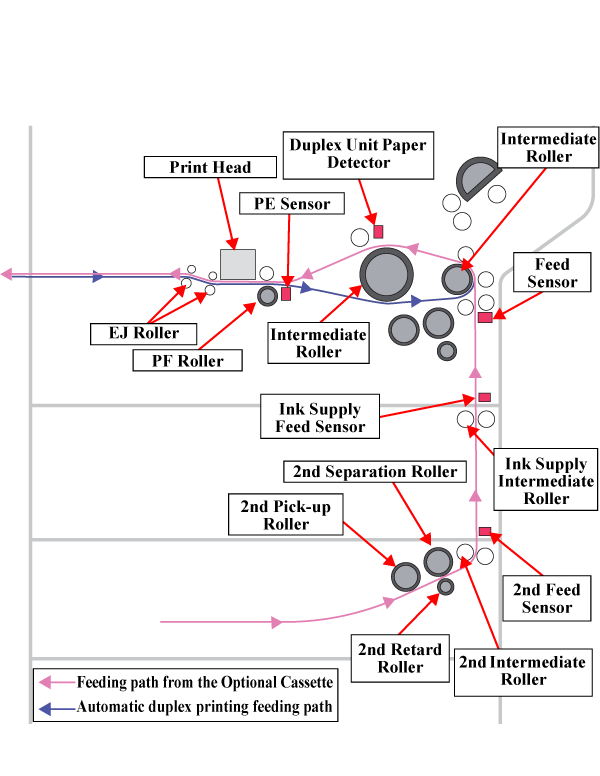
Automatic Duplex Printing
Drying time automatic determination function
The Automatic duplex printing features the auto drying time detection so as to prevent the wet printed face from rubbing with something. If the printer judges the printed front face must be dried after the front face printing, a two-step drying is carried out on the Stacker and inside the Duplex Unit*.
This product sets the optimum drying time according to the usage environment by Temperature and Humidity sensor. As a result, improving the throughput.
*: The printer stops operation and waits until the specified drying time has passed.
Back Face Printing During The Automatic Duplex Printing
If the printer judges the printed front face must be dried during the automatic duplex printing, the first drying is carried out on the Stacker after the front face printing. Then, the paper is pulled back into the printer and fed to the Intermediate Roller. The paper fed to the Intermediate Roller is fed by the Intermediate Roller (Duplex Unit) just before the paper detection point of the PE Sensor and reversed.
After feeding the paper just before the paper detection point of the PE Sensor and reversing it, the 2nd drying is carried out. After the drying is complete, the paper is fed by the Intermediate Roller up to the paper detection point of the PE Sensor and printing is made in the same way as the front face printing.