
FAX Communication Log
A history report of sent and received 30 fax jobs.
Settings are available for Display, Auto or Manual Print (every 30/time/off).
Codes of communication error are not displayed on the report by default. To display the error codes, set [Report Format] to [Detail].
Printing Procedure
| Manual | [FAX] > [(Menu)] > [FAX Report] > [FAX Log] = Select [Print] |
|---|---|
| Auto | [Setup] > [General Setting] > [FAX Settings] > [Report Settings] > [FAX Log Auto Print] = [Off] / [On (Every 30)] / [On (Time)] |
Output Setting
| Report format | [Setup] > [General Setting] > [FAX Settings] > [Report Settings] > [Report Format] = [Simple] / [Detail] |
|---|
Output Sample
This sample is an example of a different model and may differ from the actual one.
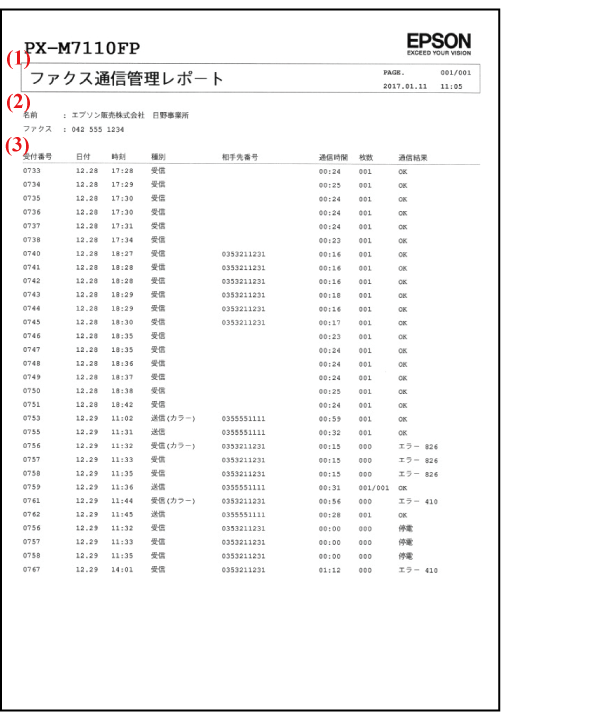
| (1) | Subject | Report name |
|---|---|---|
| PAGE | Number of pages to be reported (number of pages/total number of pages) | |
| Date and time | Printed time (yyyy.mm.dd hh:mm) | |
| (2) | Name | Sender’s name registered to the product |
| Fax | Sender’s fax number registered to the product | |
| (3) | Reception number | Job number |
| Date/Time | Starting time of communication | |
| Type | Sending/Receiving/Polling Sending/Polling Reception/PC Sending/Forwarding |
|
| Destination number | Refer to “Indications of destination number” | |
| Communication time | mm:ss | |
| Number of pages | Memory sending: Number of pages of communication succeeded/total number of pages |
|
| Communication result | Succeeded: OK Failed: Error details (Line Busy, No answer, Communication error, No tones, Line is not connected, Incorrect port connection, Cancel, Electricity failure, etc.) Error xxx (Report Format = only when set to Detail) |
Indications of destination number (in priority order)
| Sender (Send/Polling Receive)*3 |
|
|---|---|
| Receiver (Receive/Polling Send) *3 |
|
*1:
Usually the destination fax ID signals (CSI/TSI/CIG) are registered with numbers (telephone number is used in most cases). If these are registered with text, the registered text are displayed as they are.
When registering in this product, select [Setup] > [General Settings] > [FAX Settings] > [Basic Settings] > [Header] > [Your Phone Number] (number, space, or + only).
*2:
For a product with Caller ID, the Destination fax ID is displayed when the caller ID is enabled ([Fax settings] > [Basic settings] > [Caller ID display]), and the sender notifies its telephone number.
If the notified telephone number has been registered in the contact list, the registered name is displayed on the panel of the receiver.
*3:
Usual settings are Sending/Polling Reception for sender, Receiving/Polling sending for receiver.
However if Manual send/Manual receive is enabled, these settings may be reversed. In addition, if a fax is sent with [Connected telephone] or [On hook dial] and Manual Send/Manual Receive is turned on, the “destination fax ID” is always displayed.
Case example
| Case | Indications of destination number |
|---|---|
When receive a fax through caller ID line, then response with connected telephone and perform Manual Send. |
Sender is displayed. |
When send a fax with a connected telephone and perform Manual Send; |
Receiver is displayed. |
When send a fax with on hook dial (Contact list/Direct dial) |
Receiver is displayed. |