103 Counter Information
Displays the life counter of the periodic replacement parts.
 Note / 補足 Note / 補足 |
|
Menu list
| Unit | Program No. | Menu Name | Remarks |
|---|---|---|---|
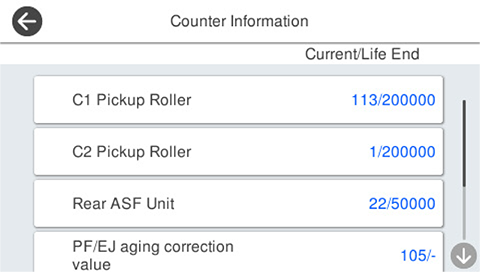
| Main Unit | 10301 | C1 Pickup Roller | --- |
| Optional Paper Cassette | 10302 | C2 Pickup Roller | Displayed only when the option is connected. |
| 10303 | C3 Pickup Roller | ||
| 10304 | C4 Pickup Roller | ||
| Main Unit | 10305 | Rear ASF Unit | --- |
| 10306 | PF/EJ aging collection value | Due to a deteriorated counter, service life is not displayed and a “-” display results. | |
| 10307 | ASF aging collection value | ||
| 10310 | ADF LD Roller | --- | |
| 10315 | Option stapler | Displayed only when the option is connected. | |
| 10330 | Routine Maintenance | --- |
Confirm and reset procedure
Counter information check
- Start the service support mode. (Starting Service Support Mode)
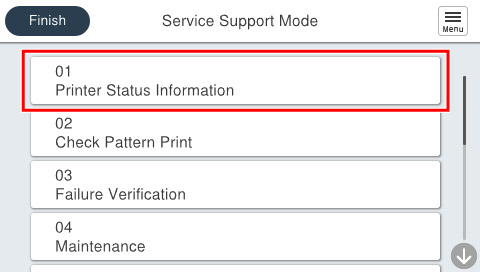
- Select [01 Printer Status Information].
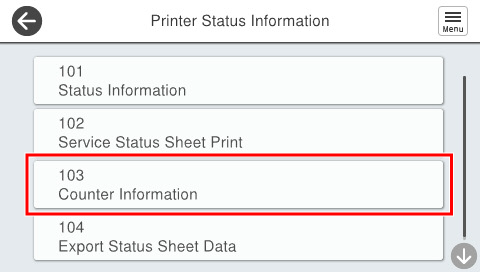
- Select [103 Counter Information].
- Check the counter displayed.
Counter reset
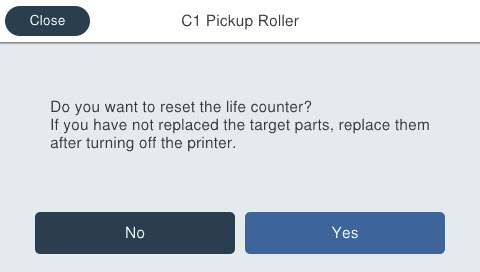
- [103 Counter Information] screen is displayed, and press the counter item you wish to reset.
- Press [Yes] to reset the counter. If you press [No], it will return to the previous screen.