
Nozzles missing
Symptom
- Nozzles missing
Suspected cause
- Nozzles clogged
- Ink system assy malfunction
- Air bubbles collected in ink tubes
- Printhead failure
Troubleshooting
| Step | Check and measure | Yes | No |
|---|---|---|---|
| 1 | Check implementation of printing troubleshooting (answer and handing an incoming call) Check implementation of printing troubleshooting at an incoming call. Has printing troubleshooting been performed? |
If not, this is to be dealt with by a service engineer. Go to step 2 |
Get a service engineer to perform printing troubleshooting. If the symptom continues to occur after performing the above, go to step 2. |
| 2 |
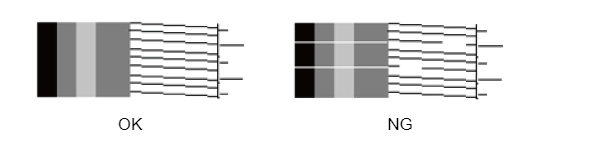
Check the nozzle check pattern Print nozzle check patterns and check whether there are nozzles missing or deflection.
|
End (No reproduction) |
Obtain the information as follows from the service status sheet and execute head cleaning according to the nozzle missing state check matrix table.
If nozzle missing is not improved after performing the above, go to step 3. |
| 3 |
Check the Inksystem Assy Check the following point about the Inksystem Assy. Inksystem Assy is correct condition? [Confirmation details]
|
Go to step 4 |
If nozzle missing is not improved after performing the above, go to step 4. |
| 4 | Check the ink tubes Visually check that air bubbles have not collected in the ink tubes. (If there are parts where the color is unmistakably pale in the supply system ink tubes, air bubbles may have collected.) Ink tube is correct condition? |
Go to step 5 | In the service support mode, execute "401 Head Cleaning" "40104 Power CL" to remove the bubbles in the tubes. If nozzle missing is not improved after performing the above,go to step 5. |
| 5 | Replace the Printhead |
Replace the Printhead. (Refer to Print Head ) If the trouble is not resolved after replacing the Printhead, contact the Epson Service Support department. |
|
Nozzle missing state check matrix table
| Cleaning History (Strongest CL within 3 days out of 5) |
Nozzle missing state | |||||
0(E0)*² |
1(E1)*² |
2(E2)*² |
3(E3)*² |
4(E4)*² |
||
A |
None | A-0*¹ | A-1 | A-2 | A-3 | A-4 |
| B | CL/CL2 | B-0*¹ | B-1 | B-2 | B-3 | B-4 |
| C | CL3 | C-0*¹ | C-1 | C-2 | C-3 | C-4 |
| D | Power CL | D-0*¹ | D-1 | D-2 | D-3 | D-4 |
- *1: If nozzle check shows no missing dots, but printing quality is not good, run the cleaning (it is not necessary if there are no problems with printing quality)
- *2: If nozzle check was not successfully performed, the number of the most recently successfully detected rank is displayed after "E". (E0, E1, etc.).
If "E" is displayed continuously, the head may be malfunctioning. - *3: Rank 4 is also displayed if the work described in "Print Head After Parts Replacement" has not been done or if the adjustment has not been completed successfully after the head replacement.
Since the rank judgment of the nozzle check is not correct, perform "60109 Nozzle Noise Check", "60110 Nozzle Rank Categorise" and "60111 Nozzle Detect Check", which are adjustments related to rank judgment.
Examples of actions to be taken:
- A-0, 1: Running CL1 is recommended
- A-2, 3: Running CL2 is recommended
- A-4, B-0~4: Running CL3 is recommended
- C-0~4: Running Power CL is recommended
- D-0~4: Determining necessity of cleaning before head replacement is recommended
How to read the “Nozzle missing state check matrix table”
- Check the cleaning history and the nozzle missing dot rank.
They can be checked on the Service Information Portal (only for Japan) or on the Service Status Sheet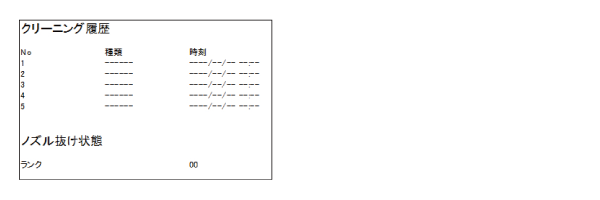
- In the matrix table, find the intersection of the confirmed cleaning history and nozzle rank.
- See the description of the intersection and the example of action to be taken, and perform the recommended action.
e.g.) If the strongest CL within 3 days is CL2 and the nozzle rank is 02, the intersection is B-2, so perform CL3 recommended for B-2.