
RGB PATTERN [B30]
Paper and Feed Tray
- Paper size: A4/Letter
- Paper type: Plain paper
- Paper feed tray: Paper cassette (C1) to paper cassette (C2), rear tray
Check pattern
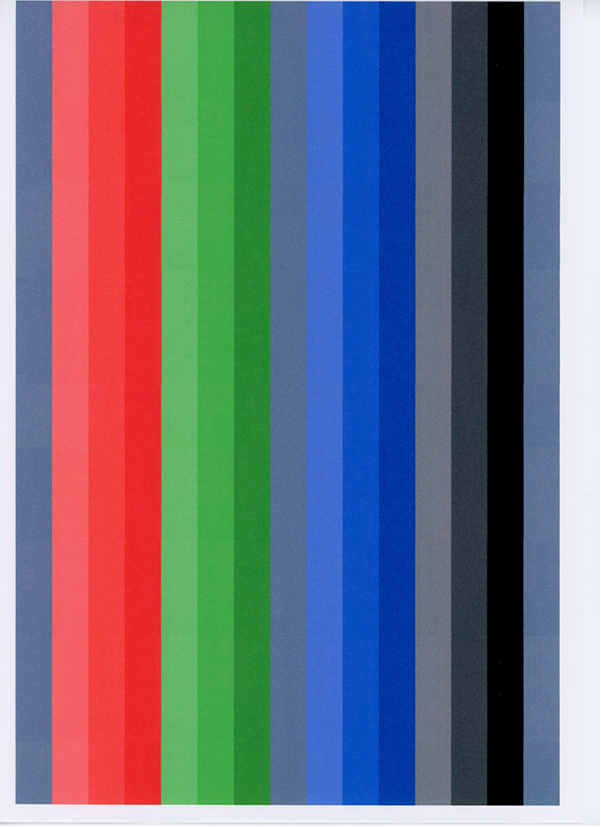
Judgment
Visually check the banding levels of the check pattern to confirm that there is no problem.
Work procedure
- Start the service support mode. (Service mode startup and operating procedures)
- Select “Adjustment Main Unit: MENU” from the service support mode top menu.
Select “RGB Pattern”.
 Check Point / チェックポイント
Select and execute the corresponding adjustment item using either procedure below.
Selecting by entering the program number
- Select “Input B No.-Main Unit Adjust” from the Adjustment menu.
- Press the [#] button and software number key is displayed on LCD. Enter program number “30”.
- Press the [#] button.
Selecting from menu
- Select “Individual Adjustment: MENU” from the Adjustment menu.
- Select “Printing Check: MENU” from the Individual Adjustment menu.
- Select “RGB Pattern” from the Printing Check menu.
- The following screen will be displayed.
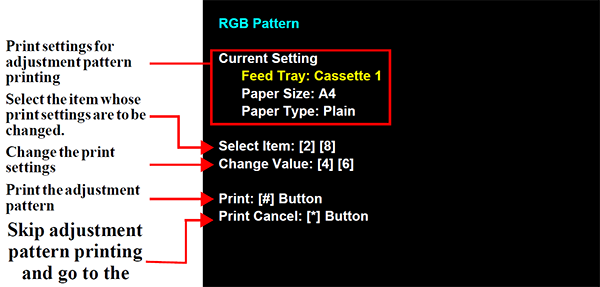
- Load paper into the paper feed tray.
- Press the [#] button to print the check patterns.
- Check the check pattern. If the result is NG, refer to the table below to take action.
| No. | Symptom | Suspected cause | Measure |
|---|---|---|---|
| 1 | Multiple white bands are occurring. | Nozzles missing |
|
| 2 | The banding level differs depending on the color. | LUT_POL adjustment value is incorrect. Adjustment value is not suited to environmental changes | Perform adjustment again.(LUT_POL adjustment (easy adjustment, adjustment by paper type)) |
| 3 | White bands are occurring overall. | Adjustment is incorrect.(Band adjustment, easy adjustment, adjustment by paper type) | Perform adjustment again.(LUT_POL adjustment (easy adjustment, adjustment by paper type)) |
| 4 | Dark lines are occurring overall. | Adjustment is incorrect.(Band adjustment, easy adjustment, adjustment by paper type) | Perform adjustment again. If this does not rectify problem,a probable cause is a defective mechanism. |
| 5 | White banding or black banding is occurring at the top and middle of the pattern. | Adjustment is incorrect. | Perform band feed adjustment again. |
| 6 | White banding or black banding is occurring at the bottom edge. | Adjustment is incorrect. | Perform band feed adjustment again. |