BEFORE REPAIR OPERATION [B90] (PRINT HEAD)
 Caution / 注意 Caution / 注意 |
This operation is necessary to performing the “ Head Replace Sequence (B80)” correctly.Make sure to perform the This operation before the print head replacement. |
- Start the service support mode. (Service mode startup and operating procedures)
- Select “Adjustment Main Unit: MENU” from the service support mode top menu.
Select “Print Head: MENU” - “Before Repair Operation”.
 Check Point / チェックポイント
Select and execute the corresponding adjustment item using either procedure below.
Selecting by entering the program number
- Select “Input B No.-Main Unit Adjust” from the Adjustment menu.
- Press the [#] button and software number key is displayed on LCD. Enter programnumber “90”.
- Press the [#] button.
Selecting from menu
- Select “Main Parts Adjust: MENU” from the Adjustment Main Unit menu.
- Select “Print Head: MENU” from the Main Parts Adjust menu.
- Select “Before Repair Operation” from the Print Head menu.
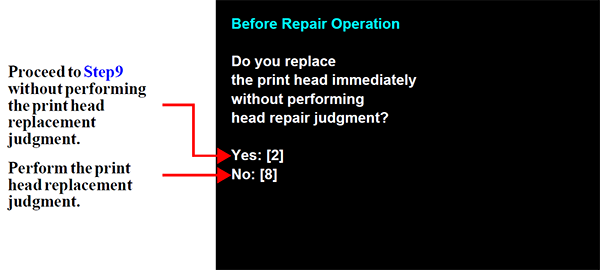
- When the screen in the following appears, select whether or not to perform the print head replacement judgment (print head replacement judgment cleaning).
- When you wish to perform print head replacement immediately (wish to not perform the print head replacement judgment): Press the [2] button and go to Step9.
- When you wish to not perform print head replacement immediately (wish to perform the print head replacement judgment): Press the [8] button and go to Step5.
- The print head replacement judgment cleaning is performed in accordance with the nozzles missing state. Print the nozzle check pattern after replacement judgment cleaning.
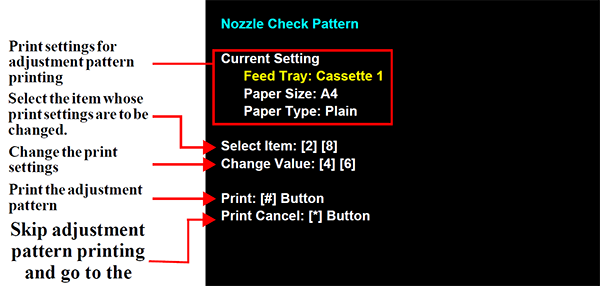
- Load paper into the paper feed tray.
- Press the [#] button to print the check patterns.
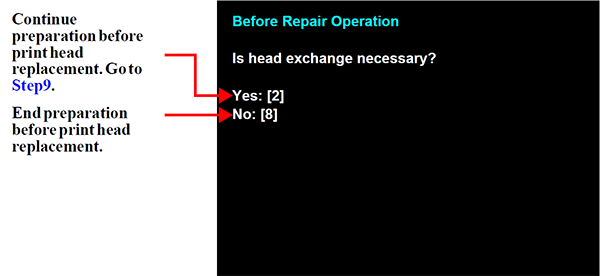
- Check the nozzle check pattern to confirm the nozzles missing state and then make a judgment of whether to replace the print head.
- If the nozzles missing state is not resolved (state in which print head replacement is required): Press the [2] button and go to Step9.
- When the nozzles missing state is resolved(state in which recovery is possible by cleaning):Press the [8] button to end the preparation before print head replacement.
- Ink Discharge [Head Ink Discharge: C08] is executed.
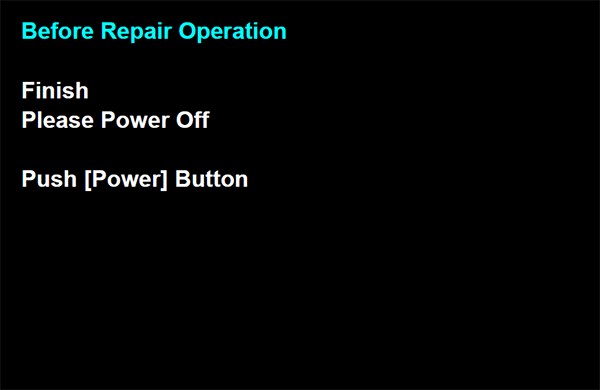
- Check that in the following is displayed and then press the power button to turn off the power. (The power turns off in the CR unlock state.)