Periodic Maintenance
Periodic maintenance is needed in this product to secure the product life (600,000 pages).
 Caution / 注意 Caution / 注意 |
After replacing them, make sure to reset the counter for the parts using the service support mode. |
| Name | Model | End of life detection | Remedy | Continuation of use | Operation after continuation of use | Part lifespan |
|---|---|---|---|---|---|---|
| Main Unit Cassette Feed Roller | PXPFR3A | (Near end)
|
Press the OK button to turn off the error LED. | Possible | Displays near end indication every 300 sheets until reach number of sheets of lifespan. (Reset when end of life reached) | 200,000 sheets |
(End)
|
|
Possible | Displays end indication every 300 sheets until reach number of sheets of lifespan. | |||
| Additional Cassette Feed Roller | PXPFR3B | (Near end)
|
Press the OK button to turn off the error LED. | Possible | Displays near end indication every 300 sheets until reach number of sheets of lifespan. (Reset when end of life reached) | 200,000 sheets |
(End)
|
|
Possible | Displays end indication every 300 sheets until reach number of sheets of lifespan. | |||
| Rear ASF Unit |
Refer to parts List* | (Near end)
|
Press the OK button to turn off the error LED. | Possible | Displays near end indication every 300 sheets until reach number of sheets of lifespan. (Reset when end of life reached) | 50,000 sheets |
(End)
|
|
Possible | Displays end indication every 300 sheets until reach number of sheets of lifespan. | |||
| Periodic Maintenance*2 (Ink System Assy, etc) |
--- | (Near end)
|
Press the OK button to turn off the error LED. | Possible | Displays near end indication every 300 sheets until reach number of sheets of lifespan. (Reset when end of life reached) | 300,000 sheets |
(End)
* If the periodic maintenance has been performed, no indication is displayed even when 300,000 sheets are reached. |
Refer to Periodic Maintenance |
Possible | Displays end indication every 300 sheets until reach number of sheets of lifespan. |
*1: Regarding the parts number, refer to part list of applicable product.
*2: To ensure stable print quality until the product reaches the end of its service life (printing of 600,000 pages), perform the periodic maintenance when printing of 300,000 pages is reached (an end error is displayed).
Periodic Maintenance
| Items | Overview |
|---|---|
| Replace the Maintenance Unit | Maintenance Unit is replaced as correspondence to Pump life of Maintenance Unit wears. |
| Cleaning the PF Scale | The PF scale cleaning is executed as correspondence to the PF scale reading defective by the ink mist accumulation of the PF scale. |
| Readjust the PG Adjust Cam | As the CR Unit bearing wears, the PG value is changes. |
| Attach the Grease to CR Shaft | As bearing part of Carriage Unit deteriorates, the load on Bearing part of Carriage Unit increases. |
| Replace the Driven Roller | Driven Roller is replaced as correspondence to the Driven Roller wears. |
| Readjustment related to Paper feed and printing | As a countermeasure to degradation of paper feed precision resulting from degradation of the Paper Feed Rollers and to fluctuation of the PG value resulting from degradation of the CR Unit Bearing, readjust the paper feed and print related adjustment items. Perform adjustments after periodic maintenance in the service support mode. |
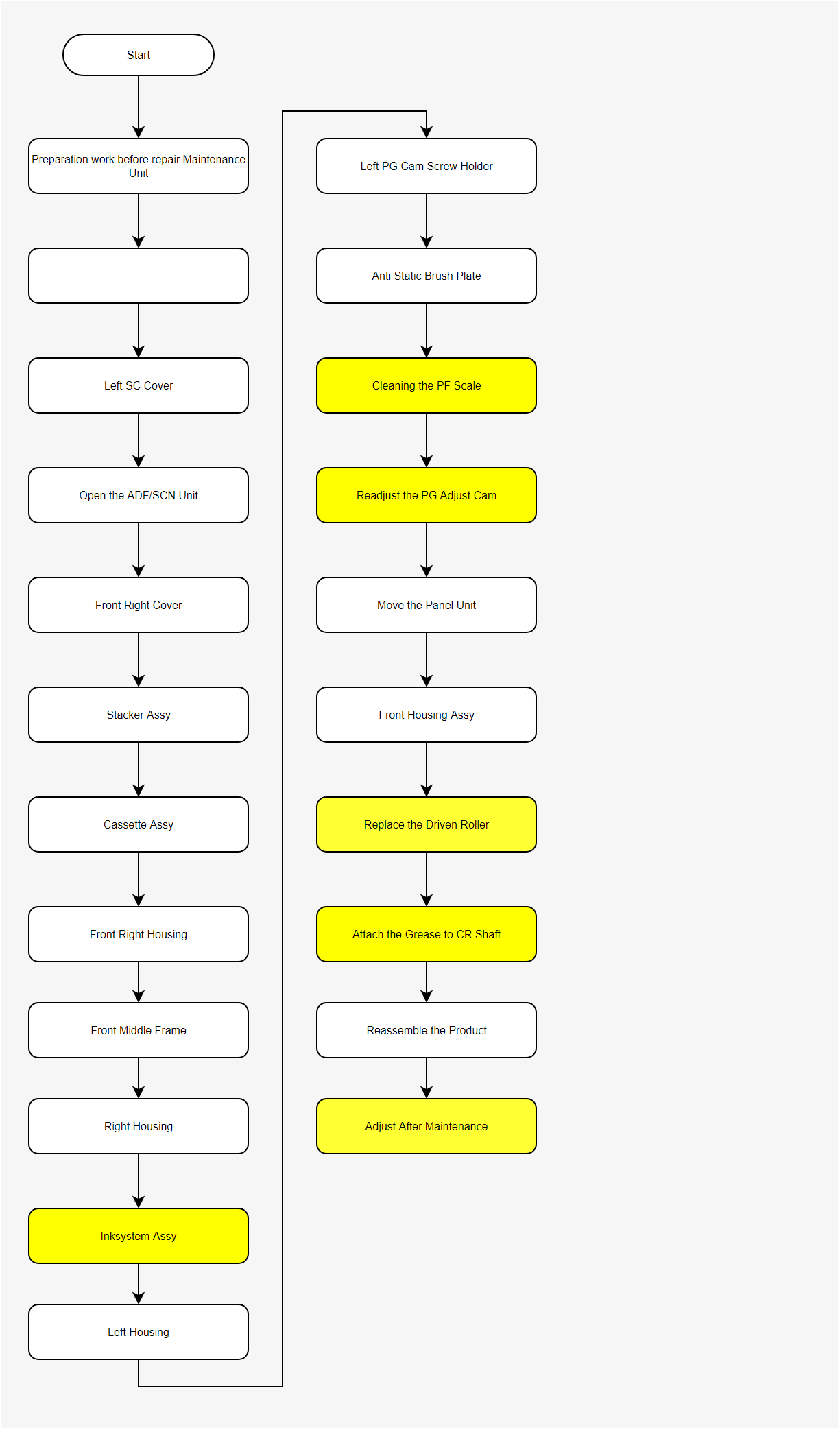
Periodic maintenance operation flow
Perform the periodic maintenance operation according to the following operation flow.