
Abnormal sound
Symptom
- Sound which is normally not emitted from the printer can be heard
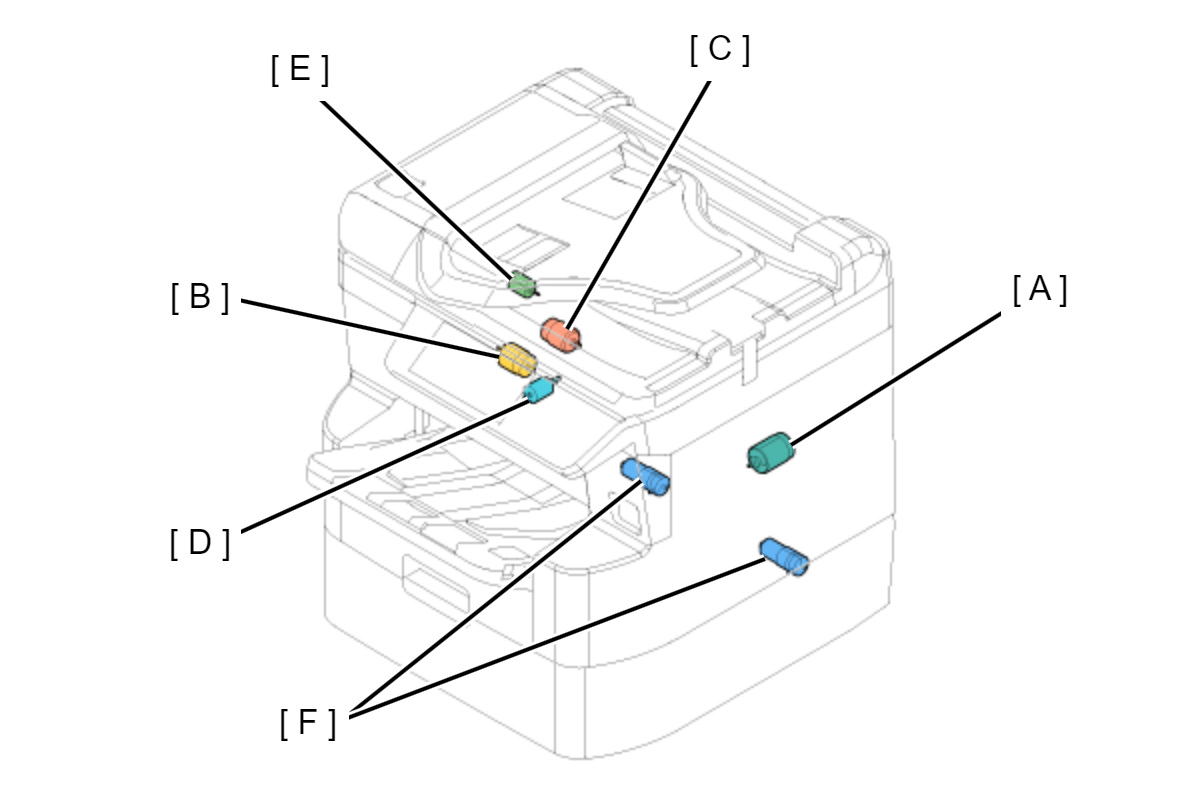
- A: CR motor
- B: PF Motor
- C: ASF Motor
- D: Lift Motor
- E: APG Motor
- F: Supply Pump Motors
Suspected cause
- Gear part on cassette side
- Lift motor gear box
- ASF motor gear box
- Rear ASF
- APG gear box
- Retard Roller
- CR operation
- Insufficient grease for roller shaft and grounding contact point
- Nip Release Solenoid
- Maintenance Unit
- Supply pump
etc.
Troubleshooting
| Timing of abnormal sound | Category | Frequency | How to check | Measure |
|---|---|---|---|---|
Before printing |
Hopper system operation sound |
Always when cassette removed and inserted |
Perform the following items from “Failure Verification” of service support mode.
|
|
| Rear ASF system | Always temporarily when rear feeding |
Perform the following items from “Failure Verification” of service support mode.
|
|
|
| ASF motor related | (When printing first sheet) |
Perform the following items from “Failure Verification” of service support mode.
|
Replace the ASF Drive Assy. (Refer to ASF Drive Assy) |
|
| APG | Immediately before printing |
Perform the following items from “Failure Verification” of service support mode.
|
|
|
| Retard Roller | Immediately before printing | Visually check the retard roller shape |
Replace the retard roller. (Refer to Retard Roller) |
|
During printing |
CR system | CR operation | Perform the following items from “Failure Verification” of service support mode.
|
|
| PF system | Always when printing | Perform the following items from “Failure Verification” of service support mode.
|
Abnormal sound from left side of main unit
Abnormal sound from right side of main unit
|
|
| Nip Release Solenoid | Temporarily always only when feeding (single sound) |
Perform the following items from “Failure Verification” of service support mode.
|
Check that the solenoid is fixed appropriately. |
|
| ASF motor related | (When print multiple sheets) | Perform the following items from “Failure Verification” of service support mode.
|
Replace the ASF Drive Assy. (Refer to ASF Drive Assy) | |
| Between pages | Nip Release Solenoid | Temporarily always only when feeding (single sound) |
Perform the following items from “Failure Verification” of service support mode.
|
|
| ASF motor related | (When print multiple sheets) | Perform the following items from “Failure Verification” of service support mode.
|
Replace the ASF Drive Assy. (Refer to ASF Drive Assy) | |
When not printing |
PF system | When CL suction | Execute the following item from the service support mode.
|
|
When RIPS and front cover closed |
IS system | Every time when cover closed | Perform the following items from “Failure Verification” of service support mode.
|
Replace the Rear ASF Unit. (Refer to Decompression Pump Unit) |