
Name of Each Part
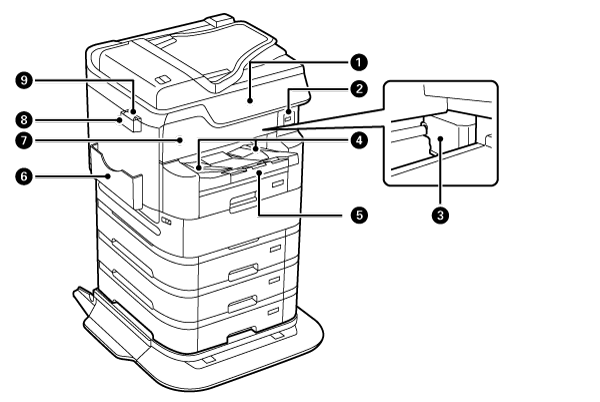
| No. | Part Name | Description |
|---|---|---|
| 1 | Control Panel | Allows you to make settings and perform operations on the printer. Also displays the printer’s status. |
| 2 | External interface USB port |
Insert external memory. |
| 3 | Print head (Nozzle) | Fires ink. |
| 4 | Paper Ejection Guide | Holds the printed paper. |
| 5 | Stacker (output tray) | Holds the printed paper. Can be pulled out by hand. Can be put back for storage by pressing with hand. |
| 6 | Document holder | Used to place the manuals. |
| 7 | Front Cover (A) | Open to remove paper jammed inside. |
| 8 | Cleaning cloth holder | Used to place the cleaning cloth. |
| 9 | Cleaning cloth | Used to clean the surface of the scanner glass. |
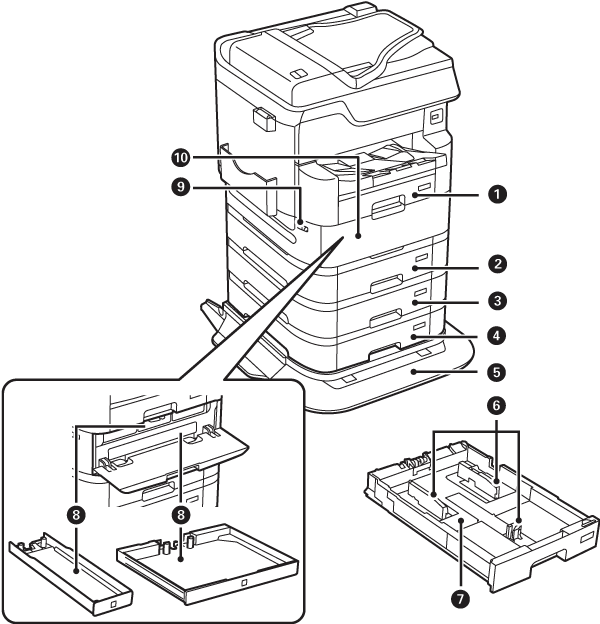
| No. | Part Name | Description |
|---|---|---|
| 1 | Paper Cassette 1 (C1) | Loads paper. |
| 2 | Paper Cassette 2 (C2) | |
| 3 | Paper Cassette 3 (C3) | Loads paper. Optional additional cassette. Can be used when options are installed. |
| 4 | Paper Cassette 4 (C4) | |
| 5 | Exclusive Printer Stand | An exclusive printer stand (with casters) to prevent overturning. Can be used when options are installed. |
| 6 | Edge guides | Feed the paper straight into the printer. |
| 7 | Paper Cassette | Loads paper. |
| 8 | Ink Pack Tray | Used to set the ink packs. |
| 9 | Cover Lock | Used to lock the ink pack cover. |
| 10 | Ink Pack Cover (P) | Opened when replacing the ink pack. |
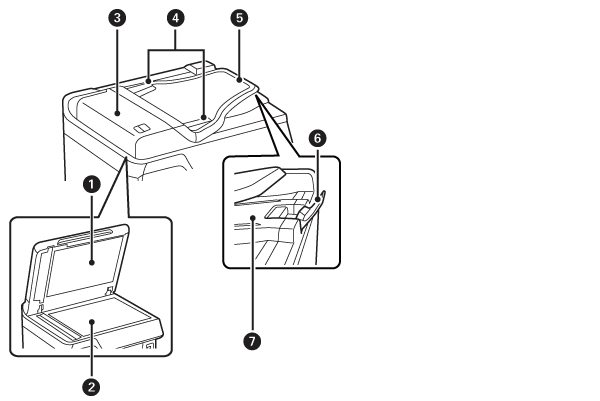
| No. | Part Name | Description |
|---|---|---|
| 1 | Document cover | Blocks the light from outside during scanning of documents. |
| 2 | Scanner glass | Place the originals. You can place originals that are not fed from the ADF such as envelopes or thick books. |
| 3 | ADF (Auto Document Feeder) Cover (F) |
Opened to remove the documents trapped in ADF. |
| 4 | ADF edge guides | Feeds originals straight into the printer. Slide to the edges of the originals. |
| 5 | ADF input tray | Feeds originals automatically. |
| 6 | Stopper | Prevents the ejected originals from falling from the ADF output tray. |
| 7 |
ADF output tray |
Holds originals ejected from the ADF. |
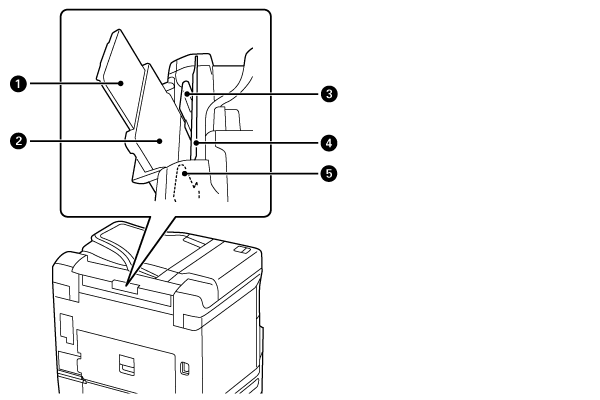
| No. | Part Name | Description |
|---|---|---|
| 1 | Paper Support | Supports the set paper. |
| 2 | Paper tray (B) | Loads paper. |
| 3 | Edge guides | Feeds the paper straight into the printer. Slide to the edges of the paper. |
| 4 | ASF Cover | Prevents foreign matter from entering inside. Usually closed during use. |
| 5 | Edge guides | Feed the paper straight into the printer. Slide to the edges of the paper. |
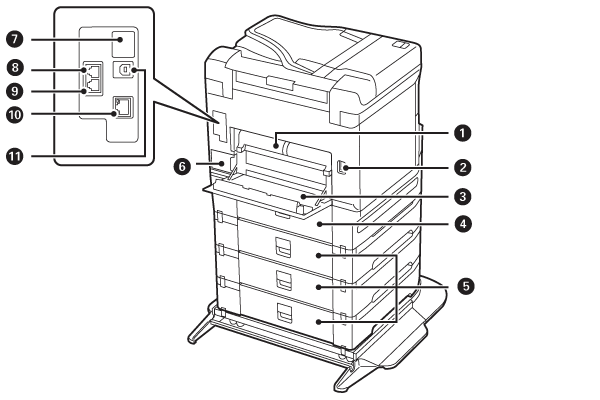
| No. | Part Name | Description |
|---|---|---|
| 1 | Duplex Unit (D2) | Detach to remove jammed paper. |
| 2 | Power Connector | Connect the power cable. |
| 3 | Rear Cover (D1) | Opened to replace the maintenance box or remove the paper trapped inside. |
| 4 | Rear Cover (D3) | Opened to remove the trapped paper. |
| 5 | Rear cover (E) | |
| 6 | Maintenance Box | Collects the waste ink discharged at the time of cleaning or printing. |
| 7 | Service Port | Normally, this is not used. The seal must not be pealed off. |
| 8 | LINE Port | Connect a telephone line. |
| 9 | EXT. port | Connect an external telephone. |
| 10 | LAN Port | Connect a LAN cable. |
| 11 |
USB Port |
Connect a USB cable for connecting with a computer. |
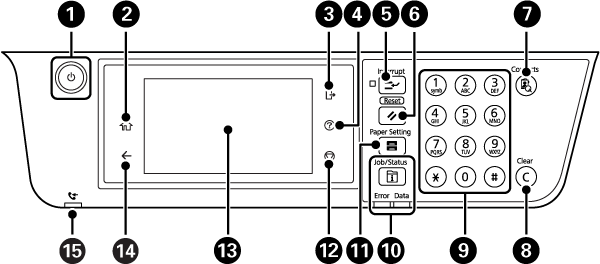
| No. | Explanation |
|---|---|
| 1 | Turns the power on/off. |
| 2 | Displays the Home screen. |
| 3 | Used to log off from the printer when [User access control] is enabled. |
| 4 | Displays the [Help] screen. The actions to take in the case of a problem, or the basic operating procedures of the printer can be checked. |
| 5 | Used to suspend a job in progress, and interrupt and execute another job. If you press this button after the interrupt operation has ended, the suspended operation is resumed. |
| 6 | Restores the setting being operated to the state before the change. If the user default settings have not been made, this button returns the settings to those at the time of purchase. |
| 7 | Displays the [Address book] search screen. Addresses can be registered, edited, and deleted. |
| 8 | Clears the number of copies and other numerical value settings. |
| 9 | Enters numbers, alphabet letters, and symbols. |
| 10 | Displays the [Job/State] menu. Allows the printer state and job history to be checked.
|
| 11 | Displays the [Paper settings] screen. Allows the paper size and paper type to be set for each paper feed device. |
| 12 | Used to suspend the operation that is currently in progress. |
| 13 | Displays items and messages. If no operation is performed for a fixed period of time, the sleep mode is activated and the display is cleared. Tap anywhere on the touch screen to turn on the display. Depending on the settings, it is possible to return to the original brightness from the sleep mode by pressing a button on the operation panel. |
| 14 | Returns to the previous screen. |
| 15 | Lights up when an unprocessed (unread, not printed, or not saved) document is received. |